

Mp3tag 3.35 – Free Tag Editor


 (60 votes, 4.00 out of 5)
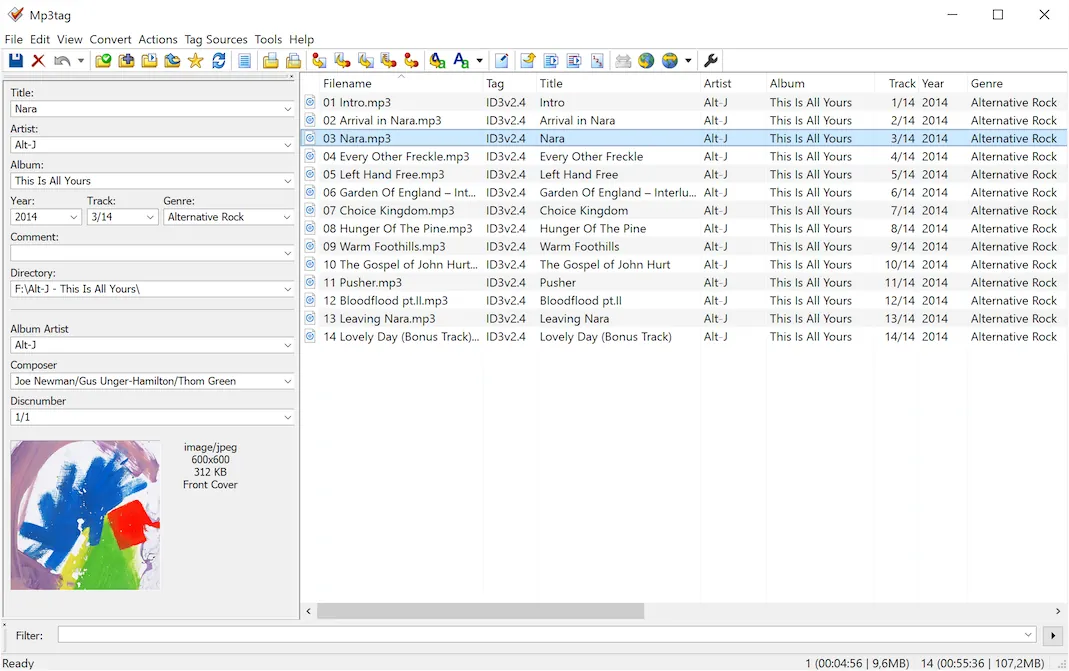
Mp3tag is a powerful and easy-to-use universal Tag Editor that allows to edit metadata of common audio formats where it supports ID3v1, ID3v2.3, ID3v2.4, iTunes MP4, WMA, Vorbis Comments and APE Tags.
It can rename files based on the tag information, replace characters or words in tags and filenames, import/export tag information, create playlists and more.
Mp3tag supports online database lookups from, e.g., Amazon, discogs, or freedb, allowing you to automatically gather proper tags and cover art for your music library.
Besides these features Mp3tag offers a variety of other functions and features ranging ranging from batch export of embedded album covers, over support for iTunes-specific tags like media type or TV Show settings, to combining multiple actions into groups that can be applied with a single mouse click.
Mp3tag supports the following audio formats:
- Advanced Audio Coding (aac)
- Free Lossless Audio Codec (flac)
- Monkey’s Audio (ape)
- Mpeg Layer 3 (mp3)
- MPEG-4 (mp4 / m4a / m4b / iTunes compatible)
- Musepack (mpc)
- Ogg Vorbis (ogg)
- OptimFROG (ofr)
- OptimFROG DualStream (ofs)
- Speex (spx)
- Tom’s Audio Kompressor (tak)
- True Audio (tta)
- Windows Media Audio (wma)
- WavPack (wv)
Main features:
- Batch Tag Editing Write ID3v1.1, ID3v2.3, ID3v2.4, MP4, WMA, APEv2 Tags and Vorbis Comments to multiple files at once.
- Support for Cover Art Download and add album covers to your files and make your library even more shiny.
- Import from Amazon, discogs, freedb, MusicBrainz Save typing and import tags from online databases like Amazon, discogs, freedb, MusicBrainz, and more.
- Replace characters or words Replace strings in tags and filenames (with support for Regular Expressions).
- Create Playlists automatically Create and manage playlists automatically while editing.
- Rename files from tags Rename files based on the tag information and import tags from filenames.
- Export to HTML, RTF, CSV Generate nice reports and lists of your collection based on user-defined templates.
- Full Unicode Support User-interface and tagging are fully Unicode compliant.
Changes in Mp3tag 3.35.0 (2026-06-19):
- FIX: renaming folders using `_DIRECTORY` at ‘Convert > Tag – Tag’ or action ‘Format value’ when running under Wine could silently overwrite duplicate files.
- NEW: added support for RF64 WAV files > 4GB.
- FIX: added a confirmation prompt when selecting an item from the Find window results
list if there are unsaved tag changes and auto-save is disabled. (#71402) - FIX: lists for tracks and files at Tag Sources result dialog did not always display their selection under Wine.
- FIX: customize menu item from Tag Panel context menu opened wrong options dialog page (since v3.35-beta.2).
- FIX: regression where decimal `BPM` values were no longer truncated to integers when writing MP4 tags, which resulted in a user-defined `TEMPO` field being written.
- FIX: renaming folders using `_DIRECTORY` at ‘Convert > Tag – Tag’ or action ‘Format value’ was not supported when running under Wine. (#71358)
- CHG: disabled smart hiding of consecutive toolbar separators or leading and trailing spacers.
- CHG: moved selected file-related configuration options to ‘Options > Files’.
- FIX: MP4 atoms with empty content could not be modified or removed. (#71325)
- NEW: added configuration option for replacement of folder separator used when renamingfiles from tags (see ‘Options > Files’).
- FIX: writing and removing tags failed with error message if path name could not be determined by file handle (since v3.34.1).
- CHG: prevent creation of subfolders at ‘Convert > Tag – Filename’ if field value contains backslash character `\`.
- FIX: field `TITLE` was always imported as `Title` from Tag Sources.
- CHG: MusicBrainz Tag Source: prefer `ALBUMARTIST` over `ARTIST` for search field.
- FIX: Discogs Tag Sources: prevent composer metadata from being carried over from the previous standard track into subtracks.
- CHG: Discogs Tag Sources: automatically remove disambiguation numbers from `ALBUMARTISTSORT`.
- CHG: Discogs Tag Sources: use Discogs convention of “Various” for various artists.
- CHG: minor adjustments to drawing of File List column header text.
- FIX: after deleting the current directory from the Tag Panel directory field, navigating backward or forward via Alt+Left arrow and Alt+Right arrow still remembered the deleted directory.
- NEW: added support for spacer items when configuring toolbars.
- NEW: added format string helper button and menu to import cover and export cover action dialogs.
- FIX: icons for helper buttons in various dialogs were too small and are drawn with artifacts in some resolutions when dark mode was enabled.
- FIX: menu items in the Utils context menu were incorrectly enabled while an operation was in progress.
- NEW: added support for docking Filter left and right of toolbars.
- LNG: updated Brazilian Portuguese, Bulgarian, Catalan, Corsican, Italian, Norwegian, Polish, Simplified Chinese, Slovak, Spanish, Ukrainian, and Vietnamese translations.
Homepage – https://mp3tag.de
Supported Operating Systems: Windows 7, 8, 8.1, 10, 11 (32-bit, 64-bit).
Size: 5.23 MB
DOWNLOAD Mp3tag 3.35.0 for Windows
DOWNLOAD Mp3tag 3.35.0 x64 for Windows
DOWNLOAD Mp3tag Trial for Mac
TOP ALTERNATIVES
-
 MAGIX SOUND FORGE Pro 18 offers professional-quality mastering, editin...
 -
 Audacity is a free, easy-to-use and multilingual audio editor and reco...
 -
 MAGIX Music Maker FREE 2024 is the ideal program for creating professi...
 -
 MP3 Splitter Joiner Pro splits a large MP3 file (up to 10 GB) into mul...
 -
 Ashampoo Soundstage Pro brings the rich surround sound of a movie thea...
 -
 n-Track Studio 10 turns your PC into an easy to use multitrack audio r...
 -
 Dexster is a perfect audio editor tool for your audio production that ...
 -
 MAGIX SOUND FORGE Audio Studio software is everything you need to mast...
 -
 EZ Meta Tag Editor is a powerful and easy to use audio file metadata e...
Leave a Reply
0 Comments on Mp3tag 3.35 – Free Tag Editor