

Audacity 3.7.8 – Free audio software



 (43 votes, 3.77 out of 5)
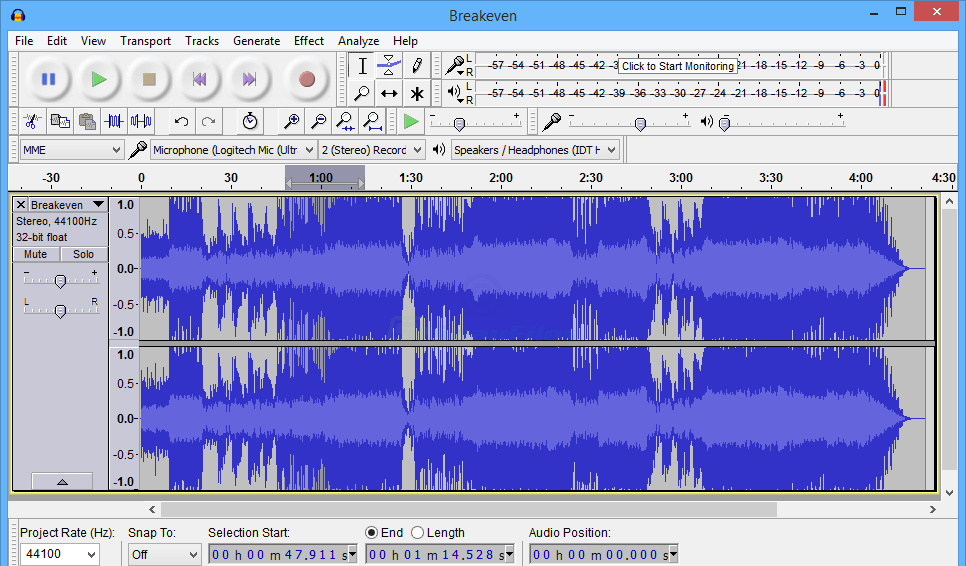
Audacity is a free, easy-to-use and multilingual audio editor and recorder for Windows, Mac OS X, GNU/Linux and other operating systems. You can record sounds, play sounds, import and export WAV, AIFF, AAC, MP4, Ogg Vorbis, and MP3 files, and more.
Use it to edit your sounds using Cut, Copy and Paste (with unlimited Undo), mix tracks together, apply effects to your recordings, change the speed or pitch of a recording, and really much more.
Audacity enables FLAC support. The program also has a built-in amplitude-envelope editor, a customizable spectrogram mode, and a frequency-analysis window for audio-analysis applications.
The program has the built-in effects, including Bass Boost, Wahwah, and Noise Removal, and it also supports VST plug-in effects.
Audacity is without a doubt one of the best and easiest digital audio editors on the market and it will meet any requirement at 100% no matter if it is home or professional audio edition.
Audacity Key Features:
- Cut, copy, splice or mix sounds together.
- Record live audio.
- Supports 16-bit, 24-bit and 32-bit (floating point) samples (the latter preserves samples in excess of full scale).
- Record computer playback on Windows Vista and later by choosing “Windows WASAPI” host in Device Toolbar then a “loopback” input.
- Import and Export WAV, AIFF, AU, FLAC and Ogg Vorbis files.
- Convert tapes and records into digital recordings or CDs.
- Edit WAV, AIFF, FLAC, MP2, MP3 or Ogg Vorbis sound files.
- Import and export AC3, M4A/M4R (AAC) and WMA with the optional FFmpeg library (this also supports import of audio from video files).
- Numerous effects including change speed or pitch and vocal reduction or isolation (given suitable stereo tracks).
- And more! See the complete list of features.
Changes in version 3.7.8:
- Fixed an exception thrown when pasting into a newly-created track
- Fixed tone generation, waveform-scale setting, SetClip Name parameter,
and clip-boundary command names for scripting and macros - Fixed the loading of presets for the Distortion effect
- Fixed paste into an empty audio track not preserving the source sample rate
- Allowed AltGr modifier in label and clip name editing
- Added options to choose where silence is truncated (start/middle/end)
- Added Podcast 2.0 chapters JSON export for label tracks
- Improve UI on HiDPI displays on Linux/wxGTK
- Fixed MixerBoard Mute and Solo button display
- Fixed multichannel FLAC import
- Fixed envelope being broken after joining clips
Changes in version 3.7.7:
- Added checksum to WavPack export
Changes in version 3.7.6:
- Added FFmpeg 8 support
- Added Spectrogram Wavelet analysis (Thanks, Klaus Gram-Hansen (@kgramhans))
- Added middle-mouse drag panning over track panel (Thanks, Anders Jenbo (@AJenbo))
- Added “Import from audio.com” dialog to import audio files from audio.com
- Fixed unstable cloud audio uploads
- Allowed export as OGG/Opus when exporting with FFmpeg
- Fixed 16-bit FLAC import
- Library updates: libcurl to 8.17.0, wavpack to 5.7.0
Changes in version 3.7.5:
- Windows on ARM support
- FLAC importer now supports 32-bit PCM
- Fixed crash when rendering spectrum view
- Fixed lost focus when registration window was closed
- Fixed crash on wav import (when audio file is up to 7 ms long)
- Fixed crash when using Macro Wizard
- Updated libopus to 1.5.2, updated libcurl to 8.12.1, updated libpng to 1.6.50
Homepage – https://www.audacityteam.org
Supported Operating Systems:
- Windows 10, Windows 11.
- macOS 10.9 and later.
Size: 18.1 MB
DOWNLOAD Audacity 3.7.8 for Windows 32-bit
DOWNLOAD Audacity 3.7.8 for Windows 64-bit
DOWNLOAD Audacity 3.7.8 for macOS Intel
DOWNLOAD Audacity 3.7.8 for macOS Apple Silicon
DOWNLOAD Audacity 3.7.8 for Linux AppImage
DOWNLOADS for All OS
TOP ALTERNATIVES
-
 SuperEZ Wave Editor Pro is a visual music file editor designed for hom...
 -
 MP3 Splitter and Joiner Pro is the advanced version of MP3 Splitter an...
 -
 n-Track Studio 10 turns your PC into an easy to use multitrack audio r...
 -
 MAGIX MP3 Deluxe 19 is the complete solution for your music collection...
 -
 GoldWave is is a top rated, a comprehensive, affordable, professional ...
 -
 Steinberg Nuendo 15 empowers professionals working in audio, live and ...
 -
 EZ CD Audio Converter (formerly Easy CD-DA Extractor) is all-in-one so...
 -
 CyberLink AudioDirector 16 is a professional application for audio edi...
 -
 mp3DirectCut is a fast and extensive audio editor and recorder for com...
Leave a Reply
0 Comments on Audacity 3.7.8 – Free audio software