

WinGate 9.5.2 Build 6199 – Proxy Server



 (6 votes, 3.33)
 Loading...
WinGate Proxy Server is a sophisticated integrated Internet gateway and communications server designed to meet the control, security and communications needs of today’s businesses.
In addition to a comprehensive range of features, WinGate Proxy Server’s license options provide you the flexibility to match your needs to your budget, whether you need to manage an enterprise, small business, or home network.
WinGate will share most types of Internet connections effortlessly. It allows multiple users to simultaneously surf the web, retrieve their email. Also they able to chat with online messaging, as if they were directly connected to the Internet.
Whether it is a simple dialup modem or hi-tech broadband solution, WinGate can help to make the most out of the connection.
WinGate will handle requests from a wide variety of Web applications and Internet protocols. Such as Web browsers, Messaging software, FTP and SSL. WinGate also supports DirectPlay Internet games and Real Time Streaming Audio/Video.
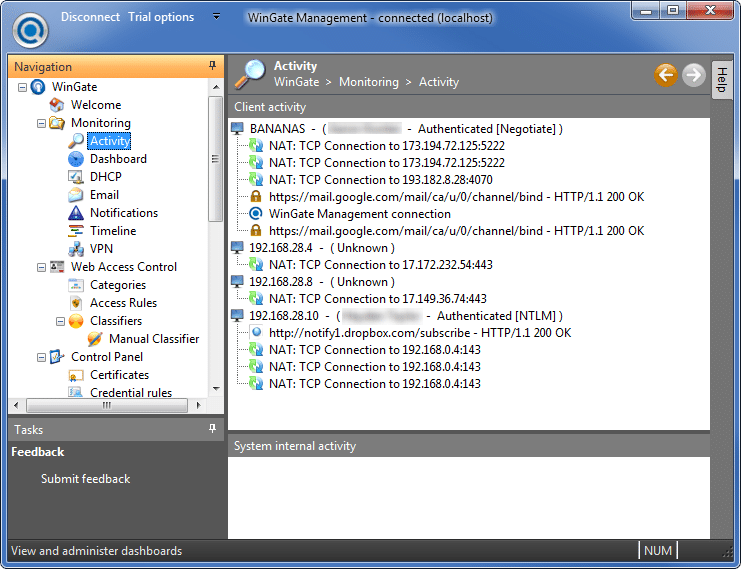
With WinGate’s user database and policies, parents and administrators alike can limit and control users access to the web. That lets you easily examine the logging, auditing, and a real time activity and history viewer – detailed records of user activities. This makes WinGate an ideal choice for Internet cafes and network administrators who work in environments where need to monitor closely Internet access needs.
WinGate comes complete with a built in firewall t. It ensure that each Internet connection is safe from attacks by hackers and intruders from the Internet. Your network safety can be further enhanced with optional plug-in components, available seperately, which will scan incoming data for viruses, or filter out inappropriate content. This gives peace of mind to both parents and network administrators, so that you can be sure that your family or co-workers are using the Internet appropriately.
WinGate Key Functions:
- Provide secure and managed Internet access for your entire network via a single or multiple shared internet connections
- Enforce advanced and flexible access-control and acceptable use policies
- Monitor usage in real time, and maintain per-user and per-service audit logs.
- Stop viruses, spam and inappropriate content from entering your network
- Provide comprehensive internet and intranet email services.
- Protect your servers from internal or external threats.
- Improve network performance and responsiveness with web and DNS caching
- Ease administration burdens on your internal networks.
Key Benefits:
- Improved Employee productivity
- Minimised time and resources required to maintain network integrity
- Reduced Employer liabilities
- Improved efficiency, responsiveness and reliability of network access
Changes in version 9.5.2 Build 6199 (2026-11-16):
- Fix: NTLM: “An internal error occurred in WinGate” a recent Windows update (KB5132061 from 10 November) changed the way SSPI handles NTLM tokens. This broke WinGate Management on Windows 11 connecting to WinGate when using the WinGate user database.
- Change: Minidumps: changed minidump generation to include more information, and do less work prior to the actual minidump generation to alter reported memory less (specifically generation of our call-stack information associated file).
Changes in version 9.5.1 Build 6194 (2026-11-11):
- Fix: JavaScript: Fixed problem with various operators when comparing runtime inbuilt types with wingate object-based types. For example if(Request.Server == “somewhere.com”) was broken and would always return false.
- Change: Schema: added variant type to built-in types, WinGate API SDK users can now register arguments for functions to take variant types.
- Change: Events: Added support in event processors to push output data to the event (PushOutputData function). If you are using script to halt an event (Event.Control = 1), and you want to call a registered event source capability (Event.Result) which requires data, you can now provide this. For example, if you set a WWW proxy result to Event.Result = “Divert”, you can now specify the target URL in script. Previously you needed to use a result object to do this.
Changes in version 9.5.0 Build 6193 (2026-11-09):
- Change: Javascript: Further performance improvements to javascript runtime and loading, with compiler optimisationsSuppress outputting unused literals, suppress generation of unused results from function calls, and operators.
- Change: Lua: major performance improvement to Lua actionNo longer compile on each invokationNo longer load all objects and membersLoading of objects and members is on demand.
- Change: Data List membership in policy: added checkbox to add the item to the list if it is not found.
- Change: WWW Schema: added RequestsThisConnection to WWWSession schema, so policy can consider this.
- Change: IPAddr Schema: added InCIDR function to IPAddress, to make it convenient to test rules formatted as CIDR.
- Change: Lua: removed checkbox for loading librariesThis is now handled in the script with the import() callauto migrated scripts with comment about this, and call if the flag was previously setThis allows you now to choose exactly which libraries to load.
- Change: SchemaScript: Expression evaluator, fixed a few problems in tokenizer for schemascript, a couple of EOF issues, and correctness of numeric floating point literals with exponentsAdded support for binary 0b1100 literals.
- New: JavaScript: Added native support for array and map literals (e.gvar a = { ind: value, ind: value} and var a = [0,1,2,3]Added support for member access of arrays (arr[“member”] === arr.member)
- New: JavaScript: Can now call members on intrinsic types (basic strings, numbers, bools, arrays and maps) e.gvar a = “hello”; var b = a.length; a.toUpperString().
- New: JavaScript: can obtain references to functions and call them later, e.gvar set = Request.Headers.Set; set(“Header”, “Value”);
- Fix: JavaScript: Fixed stack leaks relating to unused results of function calls or other expressions.
- Fix: JavaScript: Fixed lhs/rhs evaluation precedence, now evaluates lhs prior to rhs.
- Fix: JavaScript and Lua: updated recognised keywords in the script editor
- Fix: Web server CGI support: fixed issue in CGI handling relating to wait failure for termination of process potentially causing fast loop until timeout.
- Fix: Locking: Fixed locking issue where abandoned locks could cause locks to not be released.
- Fix: Strings: fixed issue with string to lower/upper case where some Unicode code points may not be properly converted.
- Fix Dashboards: Fixed issue in dashboards, inability to select rate per day in gauge and meter items.
- Change: Data: Performance improvement adding items to a data list.
- Change: Data: Fixed lock safety issue in file-backed data lists when refreshing from updated file.
- Fix: Schema: Schema Boolean type handler, fixed issue with unhandled type for set falling through to getSame with IP4Address handler and DateTime handler, and standard string and StringA
Homepage – https://www.wingate.com
Supported Operating Systems: Windows 7, 8, 8.1, 10, 11 (64-bit only).
Size: 67.4 MB
DOWNLOAD WinGate Trial
TOP ALTERNATIVES
-
 Wing FTP Server is a professional cross-platform FTP Server featuring ...
-
 Cerberus FTP Server is a secure and reliable file transfer solution. F...
-
 Microsoft SQL Server 2008 Express with Advanced Services is a free, ea...
-
 Windows Server 2019 is the cloud-ready operating system. It delivers n...
-
Windows Server 2012 is the Cloud OS that offers businesses and service...
-
 Serv-U is a powerful, easy-to-use, Windows-based multi-protocol FTP, S...
-
 RaidenFTPD is an easy to use professional FTP daemon for Windows. With...
-
 Xlight FTP server is a high performance and easy to use server with ve...
-
 Titan SFTP Server is a security-focused SFTP server for business. It i...
Leave a Reply
0 Comments on WinGate 9.5.2 Build 6199 – Proxy Server