

BitComet 2.19 – Download Manager



 (23 votes, 3.70 out of 5)
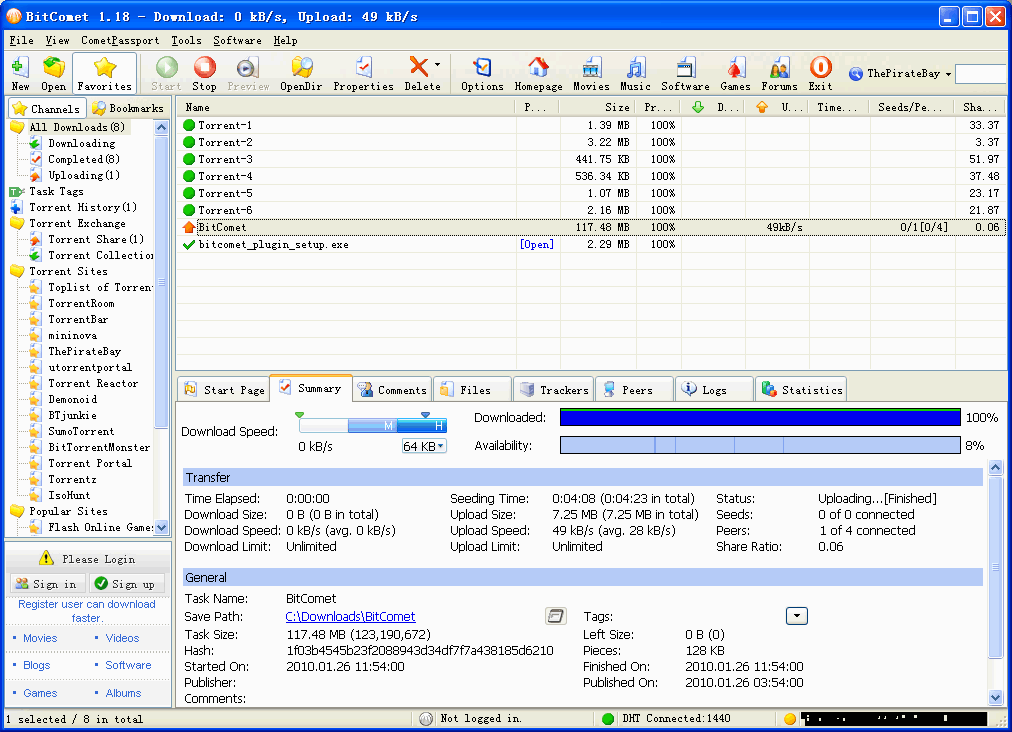
BitComet is a BitTorrent, HTTP, FTP download management software. It is powerful, fast, very easy-to-use, and completely FREE. The advanced features allow to accelerate your downloading speed up to 5 – 10 times faster, or even more.
BitComet supports simultaneous downloads, download queue, selected downloads in torrent package, fast-resume, chatting, disk cache, speed limits, port mapping, proxy, ip-filter, etc.
Also supports 52 Languages. The app automatically finds the mirror servers for the file being downloaded.
With Bitcomet you can preview the videos only minutes after downloading has begun. You don’t need to wait dozens of hours to finish the download. At present, most of the video files on the Internet have huge sizes, some files going even as big as several Gigabytes.
And there are some torrents containing fake files which may waste lots of your time to download. With this new function, you can check the content by previewing files and deciding whether to continue the download or remove the task and its files from your computer.
BitComet features:
- Long-Term Seeding. Speed up downloading and revive dead torrents
- Torrent Share. Exchange torrent while downloading
- Magnet URI. Start BitTorrent download without .torrent file any more, using DHT network.
- Preview while Downloading. Preview of .avi .rmvb .wmv and other video files is available during downloading process.
- Cross Protocol Downloading: Benefit from HTTP/FTP/eMule download sources while BitTorrent downloading.
- Intelligent Connection Optimization. Configuration is automatically set to match your connection type.
- Intelligent Disk Cache. Memory cache reduces the read/write frequency of your hard drive, increasing device life.
- Intelligent Disk Allocation. Reduce disk fragmentation.
- DHT network. Start BitTorrent download without connecting to any tracker.
- Auto Config ICF (Internet Connection Firewall) and ICS (Internet Connection Sharing) in Windows.
- Auto Config UPNP port mapping in router (the router must support UPnP).
- Also support Multi-tracker, DHT, UTF-8 extension, and UDP tracker Protocol v2.
HTTP/FTP Download – Innovative P2P Technology
- P2P downloading. BitComet automatically finds other clients and gets data from them to increase your download speed,without additional bandwidth usage of the HTTP server.
- Intelligent File Rename. Automatic choose the best name for your download file.
- Preview while Downloading. Preview of avi, rmvb, wmv and other video files is available during downloading process.
- Quick Resume. You can resume the stopped download tasks from where they left off from both HTTP and FTP servers.
- Multi-Mirror download. Automatically finds mirror servers for the downloading file. Downloads data from these servers at the same time and increases download speed 300% or more.
- Multi-Section download. Files are split into several sections which are downloaded at the same time to increase the download speed up to 500% or more.
- Multi-Language Support.
Download Management – Customization Available
- Global and Per-Task Speed Limit, for Both Upload and Download.
- Bandwidth Scheduler
- Custom-built Categories Management.
Changes in BitComet 2.18 (2025-12-15):
- GUI Improved: Remove code related to IE browser plugins
- GUI Improved: Remove the TCP/IP connection limit page in options dialog for Windows XP and Vista
- GUI Improved: Add a ‘Untagged’ button to the label toolbar above the task list
- GUI Improved: The IP filter page in options dialog has been changed to a tab layout
- GUI Improved: Added advanced setting: torrent_share.unload_memory_when_disabled
- GUI Bugfix: When the torrent list is disabled, clicking the corresponding item in the left tree list should not load data
- GUI Bugfix: When the task list is sorted by health, tasks that are seeding are not sorted correctly.
- GUI Bugfix: After the system resumes from Sleep, the main window’s tray minimized state behaves abnormally.
- Core Improved: Upgrade dependencies boost and rapidjson
- Core Bugfix: When WebUI bans a peer, operations fail for peers with unknown listening ports.
- Core Bugfix: Downloading files with special characters in their names from the WebUI file list will fail.
- Core Bugfix: Restore support for the Windows XP platform
- WebUI:Add Ctrl+A to select all items in the task list
- WebUI:Add BT task settings page in the options window
- WebUI:Add Long-Term seeding settings page in the options window
- WebUI:Add Tracker settings page in the options window
- WebUI:The IP filter page in options window has been changed to a tab layout
- WebUI:Add disk cache settings page in the options window
- WebUI:Add Scheduler settings page in the options window
- WebUI:Add up and down move buttons to the client filter page in options window
- WebUI:Playing video files supports calling the local player
- Package: Remove IE browser add-on options
Changes in BitComet 2.17 (2025-09-28):
- GUI Improved: The BT task properties dialog’s advanced page adds a separate anti-leech option, which has a higher priority than the global settings.
- GUI Improved: The BT task properties dialog’s advanced page adds a separate ‘Enable tracker’ option to control HTTP/UDP/WS trackers.
- GUI Improved: Added advanced setting: network.preferred_network_adapter
- GUI Improved: Add a rename shortcut F2 to the task list
- GUI Improved: For task lists and other sortable lists, add a ‘Reset Sorting’ feature to the header right-click menu.
- GUI Improved: After subscribing to the VIP membership in the Android app, the desktop version shows the VIP icon on the passport page at the bottom left corner. The progress bar bubble displays the points level, and the bubble with the level badge shows the valid level.
- WebUI:Add a video file preview button column and a file count column (hidden by default) to the task list
- WebUI:Add a video file preview button column to the file list
- WebUI:Add file download function to the file list context menu
- WebUI:Add online video playback function to the context menu of the file list
- WebUI:The video playback window supports loading subtitle files (vtt, srt, ass formats)
- WebUI:”About” dialog displays architecture information
- WebUI:Fix the issue where the task list selection is misaligned when there are too many tasks.
- Core Improved: WebUI connection adds ETag and Cache-Control caching mechanism
- Core Bugfix: DNS resolution issues are causing the program to fail to exit.
- Core Bugfix: When opening a torrent to create a BT task, the configuration file save location is incorrect.
- Core Bugfix: The HTTP server module returns incorrect data when handling a large number of concurrent short connections.
Homepage – https://www.bitcomet.com
Supported Operating Systems:
- Windows 7, 8, 8.1, 10, 11 (32-bit, 64-bit).
- Android 7.0 or later
- macOS
Size: 37.5 MB
DOWNLOAD BitComet for Windows [exe]
DOWNLOAD BitComet for Windows [zip]
DOWNLOAD BitComet for macOS
DOWNLOAD BitComet for Linux
DOWNLOAD BitComet for Android
TOP ALTERNATIVES
-
 BitTorrent is a peer-to-peer file sharing (P2P) communications protoco...
 -
 SugarSync is a free service that enables you to access, sync and share...
 -
 FrostWire is an open source, peer-to-peer file sharing program for the...
 -
 ApexDC++ (formerly PeerWeb DC++) is an innovative P2P program using th...
 -
 Acronis Files Connect (ExtremeZ-IP) makes easy to connect Macs to Wind...
 -
 Tribler is an open source peer-to-peer client with various features fo...
 -
 AirDC++ is a modern client for Advanced Direct Connect and Direct Conn...
 -
 Vuze (formerly Azureus) is a Java based BitTorrent client. It offers m...
 -
 Deluge is a lightweight, full-featured, free cross-platform BitTorrent...
Leave a Reply
0 Comments on BitComet 2.19 – Download Manager