

WYSIWYG Web Builder 21.2.4



 (66 votes, 3.85)
 Loading...
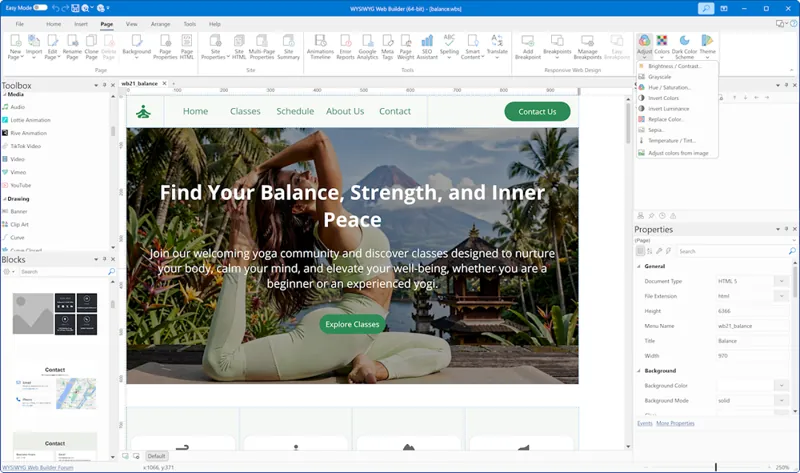
WYSIWYG Web Builder is a WYSIWYG (What-You-See-Is-What-You-Get) program used to create web pages. WYSIWYG means that the finished page will display exactly the way it was designed.
The program generates HTML (HyperText Markup Language) tags while you point and click on desired functions. You can create a web page without learning HTML. Just drag and drop objects to the page position them ‘anywhere’ you want. And when you’re finished publish it to your web server (using the build in Publish tool).
BUY NOW WYSIWYG Web Builder 21 – $59.95
The ‘Responsive Web Design’ tool allows you to create a single HTML page containing different variants of the layout. Each is optimized for specific device widths. Your website will dynamically respond to the screen size of the visitor and display the layout most appropriate to their device. These different variants are called ‘breakpoints’ and this concept is based on CSS3’s media queries.
WYSIWYG Web Builder gives you full control over the content and layout of your web page. With the ‘Standard Tools’ toolbar you can execute basic commands like Create a new web site, Open an existing web site, Save, Cut, Copy, Paste, Undo, Redo.
A breakpoint is separate ‘view’ of the page in WYSIWYG Web Builder. A page can have multiple breakpoints, each one optimized for a specific screen width. For example, you can have the standard desktop layout, one for tablets (1024 px) and another one for mobile phones (320 px).
WYSIWYG Web Builder now has a built-in designer for mobile web pages. This makes it easy to create a mobile version of your website without the need for external software.
WYSIWYG Web Builder Key Features:
- Responsive Web Design. Built-in support for layout grid, flexbox, css grid or fixed layouts with breakpoints
- Web Fonts. Easily add Google Fonts and other Web Fonts to your website.
- Animations. Add amazing pre made animations and transtions or create your own animations. Included more than 150 pre-defined animations.
- Pre-made Blocks. Use pre-made blocks to quickly get started. More than 150 blocks are available!
- Forms Tools. Send Emails, Upload Files, Store Data in MySQL or CSV, Auto Responder, Password Protect Pages, Form Validation, Conditons/Calculations
- Images and Media. Image filters, shapes, galleries, carousels, lightboxes, rollover animations, YouTube, Vimeo, HTML5 Video/Audio
- Icon Libaries. Support for Font Awesome, Material Icons and many other icon libraries
- Navigation. Navigation buttons, drop down menus, fullscreen menu, mega menu, panel menu, breadcrumb, pagination and much more!
- Extensions. Hundreds of extensions to add extra functionality to the software. Including slideshows, navigation, audio/video, webshops, data viewers etc.
Desktop publishing for the web, build web sites as easy as Drag and Drop!
- “One Click Publishing” No FTP program needed. No special hosting required, use with any Hosting Service!
- Easily create forms using the built-in Form Wizard plus Form validation tools and built-in CAPTCHA.
- Advanced graphics tools like shapes, textart, rotation, shadows and many other image effects.
- Fully integrated jQuery UI (Accordion, Tabs etc), animations, effects and built-in ThemeRoller theme editor.
- Google compatible sitemap generator / PayPal eCommerce Tools
- Many navigation tools available: Navigation bars, tab menus, dropdown menus, sitetree, slidemenus.
- Built-in Slide Shows, Photo Galleries, Rollover images, Banners etc.
- Support for YouTube, Flash Video, Windows Media Player and many other video formats.
- Unique extension (add-on) system with already more than 250 extensions available!
Create HTML5 / CSS3 websites today!
- HTML5 document type (optimized HTML5 output).
- CSS3 @font-face. Use non web safe fonts in all modern browsers.
- HTML5 audio/video and YouTube HTML5 support.
- CSS3 opacity, border radius, box shadow.
- HTML5 forms: native form validation, new input types and options, web storage.
- HTML5 canvas and svg support in shapes and other drawing tools.
- CSS3 gradients. Add cool gradient effects using native CSS3 (no images).
- CSS3 navigation menu. Create awesome menus without using JavaScript or images.
- CSS3 animations and transitions. Including support for 2D and 3D transforms!
We recommend this web development company
Changes in WYSIWYG Web Builder 21.2.4:
- Fixed: Issue with Icon Button border color
- Fixed: Missing ‘return true’ in form validation.
- Improved: Updated forum links
Changes in WYSIWYG Web Builder 21.2.3:
- Fixed: A crash when pasting device-independent bitmaps (CF_DIB) from the clipboard.
- Fixed: Padding of fixed columns in Layout Grid should be 0.
- Fixed: Issue with Copy Style from Card Items.
- Fixed: Navigation Bar outputs wrong theme colors when the button size is responsive.
- Improved: Removed ‘z’ prefixed from PLN in Shopping Cart.
Changes in WYSIWYG Web Builder 21.2.2:
- Improved: Added additional safeguards to the Site Manager to prevent pages from being accidentally moved by the user while the filter is active.
- Improved: Verify Links in Link Manager adds browser signature to https requests to prevent 403 errors.
- Fixed: Conveyor Belt image size issues.
Changes in WYSIWYG Web Builder 21.2.1:
- Improved: Optimized memory usage of blog rendering in workspace.
- Improved: border-bottom of Tabs buttons.
- Fixed: Cards with margins in Card Container no longer wrap.
- Fixed: Margin of Flex Container is ignored when nested.
- Fixed: Input Range does not support flexbox.
- Fixed: Issue with price calculations and custom currencies in Cards.
What’s New in WYSIWYG Web Builder 21:
TOP ALTERNATIVES
-
 WordPress 7 is web software you can use to create a beautiful website ...
 -
 Joomla is an award-winning content management system (CMS). It enables...
 -
 Apache HTTP Server, colloquially called Apache, is free and open-sourc...
 -
 Webyog SQLyog is the most powerful manager, admin and GUI tool for MyS...
 -
 PHP-Fusion is a lightweight open source content management system (CMS...
 -
 Microsoft’s Silverlight is a powerful development platform for c...
 -
 phpMyAdmin is a free software tool written in PHP, intended to handle ...
 -
 Adobe AIR is a cross operating system runtime that enables developers ...
 -
 Pinegrow is a desktop app that lets you build responsive websites fast...
Leave a Reply
0 Comments on WYSIWYG Web Builder 21.2.4