

UniFab Video Upscaler AI 4.2.6.3 – 36% OFF


 (170 votes, 4.08)
 Loading...
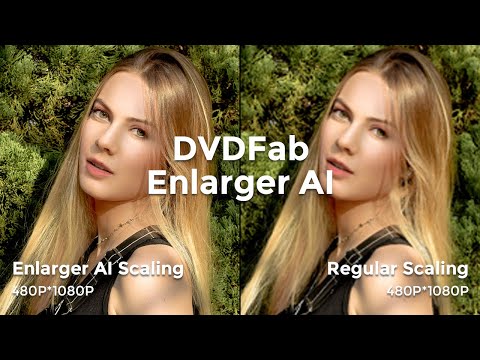
UniFab Video Upscaler AI – the world’s 1st complete, deep learning capable video upscaling solution which uses AI technology. It can enhance video videos to 720p, 1080p, 4K Video or 8K Video. Powered by AI, this video enhancer software analyzes each frame to sharpen details and optimize colors, delivering clear, lifelike visuals at any resolution.
The program enlarges the video images by 300%. And in the meantime, add in great details to improve video quality exponentially. UniFab Video Upscaler AI has trained its AI models to recognize, analyze and enhance video content based on the advanced deep learning algorithms, presenting you with a more realistic and vivid visual effect.
BUY NOW UniFab Video Upscaler AI (Lifetime) – 36% OFF
UniFab Video Upscaler AI develops a new general enhancement model that delivers impressive results across all video types, including low-resolution TV shows, black-and-white movies, homemade videos, and animations. With this efficient video restoration software, there is no need to take time to select the right model for your needs.
FEATURES:
AI Video Upscaler: Achieve Stunning 4K/8K Video Resolution
UniFab AI Video Enhancer features an advanced 8K Video Upscaler to enhance videos to 720p, 1080p, 4K, or 8K. Powered by AI, our video enhancer software analyzes each frame to sharpen details and optimize colors, delivering clear, lifelike visuals at any resolution.
Universal Model – Versatile AI Video Upscaling for All Content
This model offers a versatile solution for video upscaling, ideal for general content such as low-resolution clips, black-and-white films, travel vlogs, and more.
- Sharpen Videos: Enhance overall clarity and definition.
- Restore Details: Recover lost details for richer output.
- Color Fidelity: Optimizes colors without distortion.
Animation Model – AI Video Enhancer for Animated Content
This model is designed for animated videos like cartoons, anime, and motion graphics, delivering vibrant, high-definition visuals while preserving artistic integrity.
- Enhance Edge: Sharpen lines and edges for clarity.
- Optimize Color: Enhance colors to preserve anime style.
- Enrich Detail: Restore details in backgrounds and characters.
AI Upscale Video to 4K/8K with One Click
With AI Video Enhancer, upscaling to 4K or 8K is effortless. Just one click, and the video upscaler automatically analyzes and enhances each frame for the best quality. Whether upgrading 720p, 1080p, or older formats, our tool ensures superior video quality without the need for technical expertise.
Video Enhancer Software for Every Genre
No matter what kind of video content you’re working with, UniFab’s video enhancer is the ideal solution, it automatically analyzes and enhances videos, improving resolution and delivering sharp, detailed visuals in 4K/8K. Whether you’re dealing with YouTube videos, home footage, or animated films, our AI video enhancement software brings out the best in any content.
Denoise AI: Enhance Video Quality by Removing Noise
Denoise AI, a feature of UniFab’s AI Video Enhancer, uses advanced AI techniques to detect and eliminate noise, enhancing video clarity and detail for cleaner, sharper visuals.
Whether you’re working with nighttime cityscapes, low-light indoor events, or footage shot with high ISO settings, UniFab Denoise AI excels in:
- Remove Noise: Automatically identifies and removes noise for clarity..- Enhance Clarity: Improves detail in dimly lit or night-time scenes.
- Restore Quality: Removes noise completely, preserving original quality.
- Recover Detail: Restores lost details, resulting in vibrant, crisp videos.
Video Converter: One Click Conversion to Any Format
Video Converter, part of AI Video Enhancer, supports smooth conversion to 1000+ formats, enabling high-quality video conversion and compression for a seamless experience across platforms.
conersion icon
- Format Conversion. Convert videos in 1000+ formats for playback on any device, such as MP4, MKV, AVI, WMV, etc
- Video Compression. Reduce video file sizes while preserving original quality, ensuring easy sharing across social media platforms.
- Resolution Conversion. Adjust video dimensions to suit any platform or device, ensuring optimal display.
- Batch Processing. Process multiple videos simultaneously, saving time and increasing efficiency for large projects.
Get 50x Faster Speed with GPU Acceleration
Powered by advanced GPU acceleration technologies such as NVIDIA CUDA, AMD, and Intel Quick Sync, UniFab enhances or converts videos up to 50 times faster. Users can select their device’s GPU for optimal performance.
Directly Import Videos from DVDFab & StreamFab for upscaling
As a sister product of DVDFab and StreamFab, UniFab Video Upscaler AI allows you to directly import videos ripped from DVDs using DVDFab or downloaded via StreamFab for superior video resolution enhancement. With a single click, you’ll notice a substantial increase in your video quality.
Changes in UniFab 4.2.6.3 (2026-09-29):
- Fixed: An issue that caused feedback submissions via Feedback in the personal center menu at the bottom left of the app to fail.
Changes in UniFab 4.2.6.2 (2026-09-24):
- Fixed: Fixed an issue where FabCloud conversion tasks could fail due to synchronization timeouts.
- Fixed: Fixed an issue where Audio Upmix AI tasks could fail during output muxing.
Changes in UniFab 4.2.6.1 (2026-09-23):
- Improved: Increased the contrast of UI text for better readability.
- Fixed: Fixed an issue where AI Preview failed when processing videos shorter than 3 seconds.
- Fixed: Fixed an issue where AI Preview conversion failed in RTX Rapid Upscaler AI and RTX Rapid Denoiser AI.
- Fixed: Fixed an issue where the MOV output format did not work properly in Video Upscaler AI.
- Fixed: Fixed an issue where Trim did not take effect when using the Titanus model in Video Upscaler AI.
- Fixed: Fixed an issue where source files could not be added to Audio Upmix AI.
- Fixed: Fixed the incorrect redirection link for View Usage in the Account Center.
- Fixed: Fixed an issue where UniFab could crash on certain NVIDIA graphics cards.
- Fixed: Fixed an issue where tasks could fail when processing certain special audio formats.
Changes in UniFab 4.2.6.0 (2026-09-17):
- New: Face Enhancer AI – FabCloud uses cloud-based AI to enhance facial clarity and detail in videos.
- Fixed: Fixed an issue where some videos smaller than 160×64 could fail to convert.
- Fixed: Fixed an issue where some VP9-encoded videos could fail to convert.
- Fixed: Fixed an issue where Audio Upmix AI could cause frozen video, muted audio, or an incorrect aspect ratio when upmixing EAC3 2.0 audio to 5.1 channels.
- Fixed: Fixed an issue where Video Converter did not apply the selected font and displayed incorrect colors when burning subtitles into videos.
- Fixed: Fixed an issue where credit pre-deduction could fail when adding multiple tasks in Subtitle Generator AI.
- Fixed: Fixed an issue where the AI Subtitle Editor became unavailable when the original subtitles failed to save.
- Fixed: Fixed an issue where the Trim feature in the local version of VideoRefiner AI did not take effect.
Homepage – https://unifab.ai/video-upscaler-ai.htm
System Requirements:
- Windows 11/10/8.1/8/7 (64-bit)
- Intel i3 or above
- 100GB of free hard disk space or above
- A NVIDIA Graphics Card with more than 3GB available memory and compute capability higher than 3.5. (Make sure your Graphics Card has installed the latest driver.)
- A DVD/Blu-ray drive
- Live Internet connection required for product authorization (little network traffic used)
TOP ALTERNATIVES
-
 Nero Video 2026 will turn your videos into extraordinary movies with e...
 -
 MAGIX Video Easy HD 6 is the ideal program for easy video editing. The...
 -
 AVS Video Converter is a high quality software that allows you to rip ...
 -
 Ashampoo Video Tilt-Shift software adds the famous miniature effect to...
 -
 iDealshare VideoGo is the versatile converter to fast convert video, a...
 -
 Ashampoo Movie Studio Pro 3 offers the professional video editing with...
 -
 ACDSee Video Converter allows you to convert HD videos between all the...
 -
 Xilisoft Movie Maker is a professional movie making software, that wil...
 -
 Wondershare UniConverter is a complete video toolbox that lets you con...
Leave a Reply
0 Comments on UniFab Video Upscaler AI 4.2.6.3 – 36% OFF