

EZ Meta Tag Editor 13.2.1.1 by Poikosoft



 (42 votes, 3.93)
 Loading...
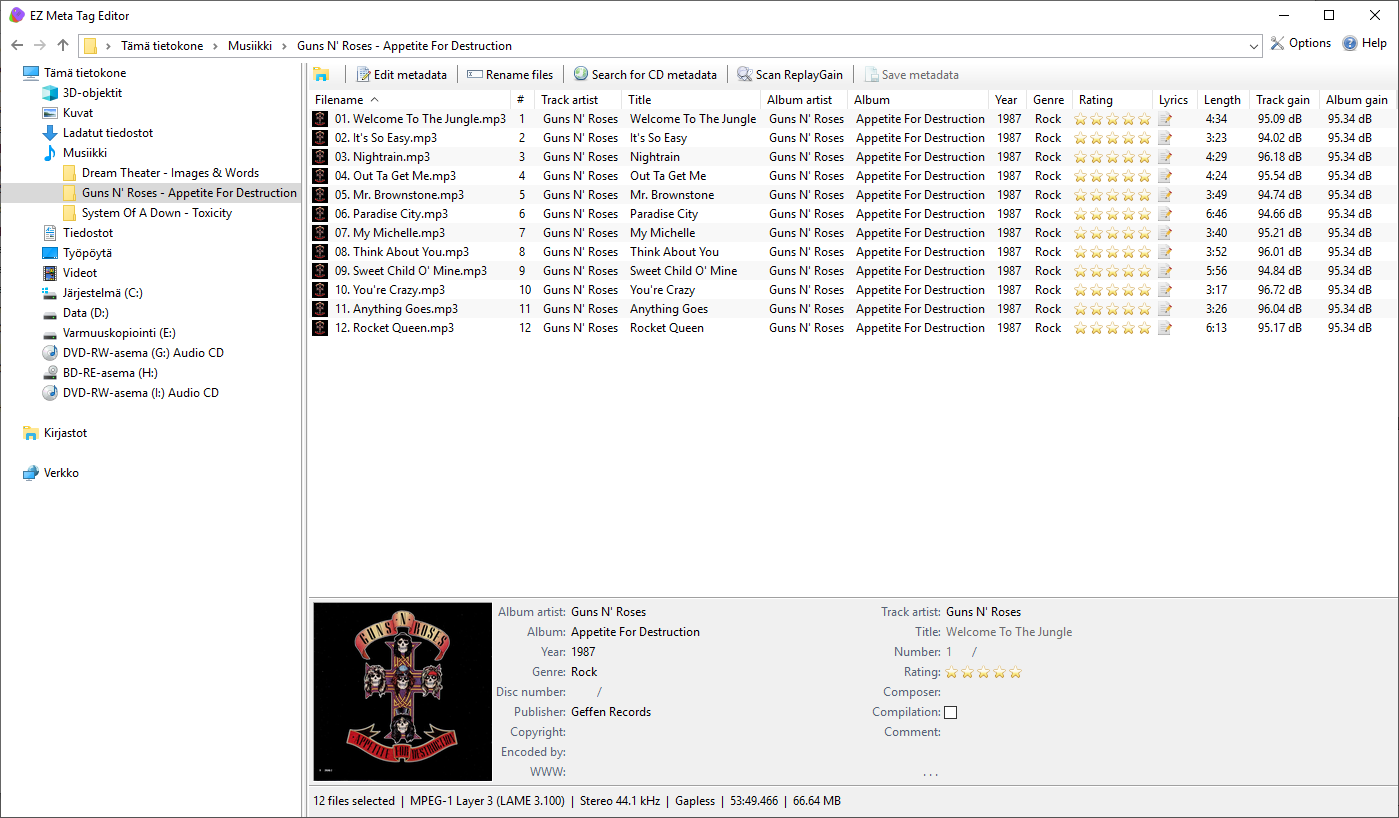
EZ Meta Tag Editor is a powerful and easy to use audio file metadata editor. It supports metadata editing of 20+ audio formats. Also you can perfect the audio files with high quality metadata and cover art. You will able to get metadata and cover art from 6 online databases.
This Poikosoft’s application allows you to browse your music collection with explorer style viewer and edit all metadata of audio files.
This enhanced metadata editor can edit all metadata tags. It has the option to edit multiple audio files at once in Batch mode. Moreover it lets you add ReplayGain metadata to your audio files.
This application offers you the easiest way to manage the metadata of your audio files.
Features:
- Easy to use
- Browse your music library with Windows Explorer style viewer
- Edit all metadata tags of audio files
- Add and edit cover art of audio files
- Supports all metadata tags
- Download metadata from 6 online databases
- Download high-quality cover art from online databases
- ReplayGain scanning for automatic loudness leveling on playback
Typical EZ Meta Tag Editor usages:
- Manage your audio collection
- Correct the tags of audio files
- Get high-resolution cover art to audio files
- Add ReplayGain information to audio files
Changes in EZ Meta Tag Editor 13.2.1:
- Significantly improved Discogs metadata parsing for malformed, multi-disc, and multi-language releases, artist name variations/disambiguation, join phrases, CDr searches, and broad release-format compatibility
Changes in EZ Meta Tag Editor 13.2:
- Improved Discogs metadata parsing with advanced support for complex releases and multi-disc formats
- Updated FFmpeg 9.0.1 decoder
- All metadata handlers and decoders recompiled and optimized
- App file sizes and memory footprint significantly reduced
- Bugfix: Help link corrected
- Bugfix: Deleting album art in metadata window resulted icon error in main window
- Bugfix: Microsoft Store: slated icon fixed
Changes in EZ Meta Tag Editor 13.1:
- Added options in EBU R 128 | ReplayGain calculation to select the loudness algorithm (“Integrated” or “Top of Loudness Range”) and peak mode (“Sample Peak” or “True Peak”)
- Loudness algorithm – “Integrated” (overall average loudness) or “Top of Loudness Range” (focuses on louder sections)
- Peak mode – “Sample Peak” (highest digital sample) or “True Peak” (inter-sample peak estimation)
- Improved Discogs search
- Removes disambiguation numbers in parentheses from artist names (e.g., “Artist (2)”)
- Improved track list parsing by skipping headings and correctly handling bonus track entries
- Updated integrated File Explorer components
- Installer: Option to launch app after installation
- Updated *all* 35 language files
Homepage – https://www.poikosoft.com
Supported audio file formats
- AAC, HE AAC, AIFF, Monkey’s Audio, DSF, FLAC, MP3, MP2, MP1, Musepack, Opus, True Audio (TTA), WAV, Wavpack, WMA, Vorbis, 3g2, 3ga, 3gp, aac, aif, aiff, ape, asf, dsf, flac, m4a, m4b, mp1, mp2, mp3, mp4, mpc, ogg, opus, tta, wav, wma, wmv, wv
ReplayGain
- Uses EBU R128 loudness metering algorithm for best accuracy (ReplayGain2)
Internet disc databases
- GD3, MusicBrainz, Windows Media Player/Gracenote, Discogs, Freedb, Amazon
Supported operating systems
- Windows 11, 10, 8, 7 (32-bit, 64-bit)
- High DPI aware, 4k compatible, Unicode, Performance optimized with SSE, SSE2, SSSE3, SSE4 (4.1, 4.2), AVX, AVX2 instruction sets
Size: 24.4 MB
DOWNLOAD Trial for Windows
TOP ALTERNATIVES
-
 FairStars Recorder is a real-time audio recorder, offering professiona...
 -
 mp3DirectCut is a fast and extensive audio editor and recorder for com...
 -
 MAGIX Music Maker FREE 2024 is the ideal program for creating professi...
 -
 iTop Voicy is the No.1 Free Real-Time Voice Changer for PC. Add more f...
 -
 Steinberg WaveLab is one of the most powerful audio editing and proces...
 -
 SuperEZ Wave Editor Pro is a visual music file editor designed for hom...
 -
 Cakewalk by BandLab is FREE award-winning Digital Audio Workstation (D...
 -
 Xilisoft Audio Converter Pro is a powerful all-in-one professional aud...
 -
 GoldWave is is a top rated, a comprehensive, affordable, professional ...
Leave a Reply
0 Comments on EZ Meta Tag Editor 13.2.1.1 by Poikosoft