

BitComet 2.22 – Download Manager

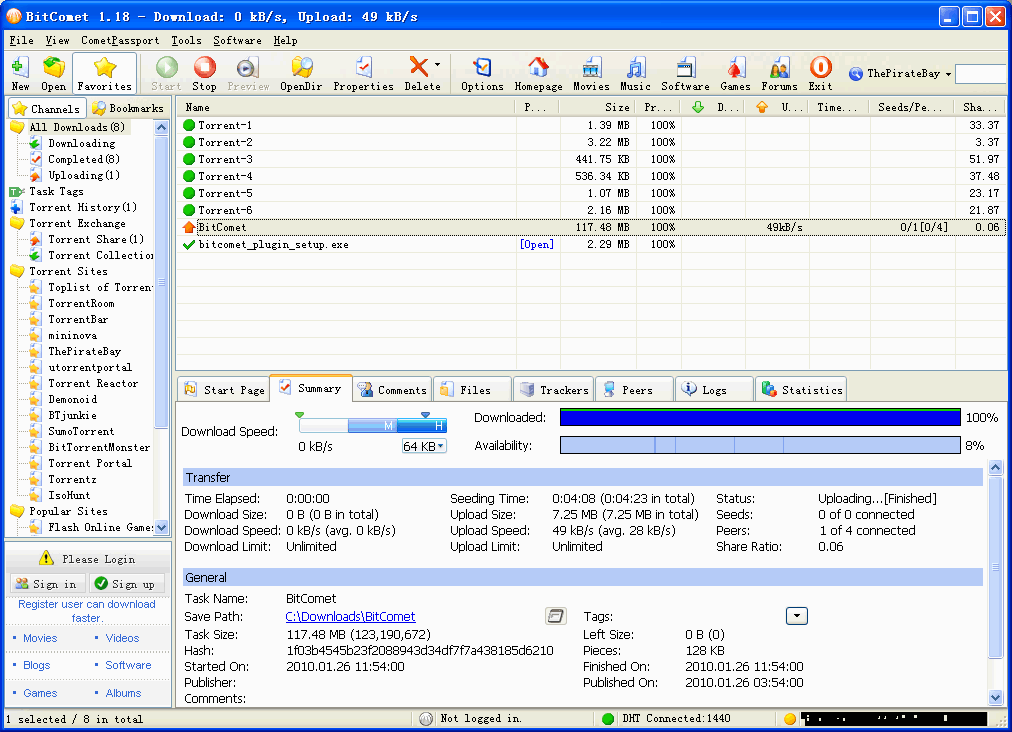
BitComet is a BitTorrent, HTTP, FTP download management software. It is powerful, fast, very easy-to-use, and completely FREE. The advanced features allow to accelerate your downloading speed up to 5 – 10 times faster, or even more.
BitComet supports simultaneous downloads, download queue, selected downloads in torrent package, fast-resume, chatting, disk cache, speed limits, port mapping, proxy, ip-filter, etc.
Also supports 52 Languages. The app automatically finds the mirror servers for the file being downloaded.
With Bitcomet you can preview the videos only minutes after downloading has begun. You don’t need to wait dozens of hours to finish the download. At present, most of the video files on the Internet have huge sizes, some files going even as big as several Gigabytes.
And there are some torrents containing fake files which may waste lots of your time to download. With this new function, you can check the content by previewing files and deciding whether to continue the download or remove the task and its files from your computer.
BitComet features:
- Long-Term Seeding. Speed up downloading and revive dead torrents
- Torrent Share. Exchange torrent while downloading
- Magnet URI. Start BitTorrent download without .torrent file any more, using DHT network.
- Preview while Downloading. Preview of .avi .rmvb .wmv and other video files is available during downloading process.
- Cross Protocol Downloading: Benefit from HTTP/FTP/eMule download sources while BitTorrent downloading.
- Intelligent Connection Optimization. Configuration is automatically set to match your connection type.
- Intelligent Disk Cache. Memory cache reduces the read/write frequency of your hard drive, increasing device life.
- Intelligent Disk Allocation. Reduce disk fragmentation.
- DHT network. Start BitTorrent download without connecting to any tracker.
- Auto Config ICF (Internet Connection Firewall) and ICS (Internet Connection Sharing) in Windows.
- Auto Config UPNP port mapping in router (the router must support UPnP).
- Also support Multi-tracker, DHT, UTF-8 extension, and UDP tracker Protocol v2.
HTTP/FTP Download – Innovative P2P Technology
- P2P downloading. BitComet automatically finds other clients and gets data from them to increase your download speed,without additional bandwidth usage of the HTTP server.
- Intelligent File Rename. Automatic choose the best name for your download file.
- Preview while Downloading. Preview of avi, rmvb, wmv and other video files is available during downloading process.
- Quick Resume. You can resume the stopped download tasks from where they left off from both HTTP and FTP servers.
- Multi-Mirror download. Automatically finds mirror servers for the downloading file. Downloads data from these servers at the same time and increases download speed 300% or more.
- Multi-Section download. Files are split into several sections which are downloaded at the same time to increase the download speed up to 500% or more.
- Multi-Language Support.
Download Management – Customization Available
- Global and Per-Task Speed Limit, for Both Upload and Download.
- Bandwidth Scheduler
- Custom-built Categories Management.
Changes in BitComet 2.21 (2026-06-23):
- GUI Improved: Added advanced setting options: bittorrent.transfer_thread_pool, using worker threads for BT transmission encryption and decryption operations, disabled by default
- GUI Improved: Added advanced setting options: bittorrent. advertising. external. utp-port, which notifies the external uTP port through PEX in NAT1 environment, defaults to true
- GUI Improved: Added advanced setting options: dht.outbound_pps_imit, dht.outbound_pending_request_limit, dht.passive_reply_pps_limit, dht.passive_reply_pending_limit
- GUI Improved: Remove advanced setting option: dht.udc_send_queue_threshold
- GUI Improved: Added advanced settings option: network.udp_socket_buffer_size_mb, default to 8MB
- GUI Improved: The default value of advanced settings option network.max_connecting_connections_per_tracker changed to 0 (automatic)
- GUI Improved: Added categories of “BT transmission thread”, “DHT thread”, and “uTP thread” to the CPU usage statistics in the traffic graph
- GUI Improved: Add uTP Port column to the peer list of BT task, hidden by default
- GUI Improved: The Add Peer dialog box in peer list of BT Task supports # and // inline comments
- GUI Improved: Improve the window dark mode switching mechanism
- GUI Improved: Added options in Remote Access Page: Local client bypass authentication, IP whitelist clients bypass authentication
- GUI Improved: Added command-line parameter –profile, which can specify the program configuration file directory for independent testing
- GUI Improved: The number of HTTP Tracker connections in the statistics page is divided into two categories: pending and half open
- GUI Improved: Add DHT packet status information to the UDP transmission status in the statistics page
- GUI Improved: Added uTP external port monitoring information to the statistics page
- GUI Improved: In expert mode, add the local external IP: utp-port obtained through PEX as a separate line to the peer list for diagnosis, but do not initiate a connection to oneself
- GUI Improved: When creating torrent files, prioritize using the DHT nodes filled in by the user, and later use the current active DHT nodes
- GUI Bugfix: After reconnecting to the remote desktop, the display position of the traffic map panel toolbar is misaligned
- GUI Bugfix: LSD countdown in tracker list is inaccurate when the number of tasks is large
- GUI Bugfix: In expert mode, the Infohash display in the value list of DHT network is incorrect
- GUI Bugfix: RSS auto downloader does not use the default download directory for task tags when using RSS feed titles as task tags
- Core Improved: Optimize the code for BT transmission encryption and decryption operations in worker threads, reducing CPU usage
- Core Improved: Optimize the scheduling algorithm for initiating TCP connections, improve the processing speed of transferring pending queues to half open queues, and balance the handling of different connection types
- Core Improved: Optimize the dynamic adjustment algorithm for the MTU of uTP packets at the sender end
- Core Improved: Optimize uTP LEDBAT congestion control algorithm, reduce CPU usage, and improve upload speed
- Core Improved: When BT task is connected to uTP, if there is no real interaction within 10 seconds after the complete metadata is sent, it will be disconnected
- Core Improved: The maximum interval for tracker announcements has been changed to 180 minutes, with jitter of ±3 minutes
- Core Improved: UDP tracker improves Connection ID timeout update and error handling
- Core Improved: Improve the IP filter disconnection handling of BT protocol and long-term seeding protocol for TCP and UDP connections
- Core Improved: Optimize DHT packet sending control to reduce the impact of high peak UDP packet rates and session counts on network devices
- Core Improved: BT Handshake Extension Protocol adds yourport field, which returns the observed external uTP port of the other party when receiving an incoming uTP connection
- Core Improved: After manually performing NAT type detection, record the detected external UDP ports for future use
- Core Improved: When replying to DHT announce_peer messages, refer to the BEP42 format and return the request source IP: port observed by this node in the top-level IP field
- Core Improved: When receiving DHT responses, process the locally visible UDP endpoint returned by the other party through the BEP42 IP field; Multiple DHT nodes need to cross confirm before acceptance, reducing the risk of a single malicious or erroneous node contaminating external uTP ports
- Core Improved: When announcing one’s external uTP port through PEX, data sources from BitComet extended handshake Yourport, PEX backhaul, and trusted DHT BEP42 backhaul can be used
- Core Improved: When DHT replies to get_piers, attach nodes nodes
- Core Improved: When DHT receives a reply from get_piers, it ignores the node distance and performs an additional extended query on the attached nodes
- Core Improved: When DHT uses domain nodes for bootstrap, it immediately adds the node to the list after resolving the domain name, and then waits for the node to reply
- Core Bugfix: When BT task disk cache reaches its limit and uploads to multiple peers, the disk read speed is much faster than the upload speed
- Core Bugfix: When the number of TCP initiated connections is too high, there is packet loss on the TCP port
- Core Bugfix: HTTP Tracker avoids repeatedly initiating connections when they are pending
- Core Bugfix: Optimize DHT packet control and eliminate the delay of the first announcement when tasks start
- Core Bugfix: After UDP Tracker Domain DNS resolve, sends request only to the first record when there are multiple records
- Core Bugfix: DHT Tracker lacks the get_peers step when manually announcing
- Core Bugfix: DHT should not send announcements to nodes that have not received tokens
- WebUI: Optimizing pagination loading of task lists and file lists
- WebUI: CPU usage statistics in traffic graph add categories of “BT transmission thread”, “DHT thread”, and “uTP thread”
- WebUI: Add Options in Remote Access Page: Local client bypass authentication, whitelist clients bypass authentication
- WebUI: Fixed the issue where information cannot be copied to the system clipboard when accessing pages via HTTP+IP
- WebUI: Add the “Copy Download Link” command to the right-click menu of the file list
- WebUI: Add uTP Port column to the peer list of BT task, hidden by default
Homepage – https://www.bitcomet.com
Supported Operating Systems:
- Windows 7, 8, 8.1, 10, 11 (32-bit, 64-bit).
- Android 7.0 or later
- macOS
Size: 35.7 MB
DOWNLOAD BitComet for Windows [exe]
DOWNLOAD BitComet for Windows [zip]
DOWNLOAD BitComet for macOS
DOWNLOAD BitComet for Linux
DOWNLOAD BitComet for Android
TOP ALTERNATIVES
-
 MediaGet is more than just a bittorrent client! You will get access to...
 -
 Tixati is a peer-to-peer file sharing program that uses the popular Bi...
 -
 ApexDC++ (formerly PeerWeb DC++) is an innovative P2P program using th...
 -
 The qBittorrent project aims to provide a Free Software alternative to...
 -
 SugarSync is a free service that enables you to access, sync and share...
 -
 eMule Plus is a new generation eMule compatible client created to impr...
 -
 COMODO cCloud is a freeware desktop application that you can use to ea...
 -
 Dropbox is a free Web based file online storage service. It lets you b...
 -
 FrostWire is an open source, peer-to-peer file sharing program for the...
Leave a Reply
0 Comments on BitComet 2.22 – Download Manager