

O&O DiskImage 22.6.1231 Premium – 74% OFF
O&O DiskImage helps to create images and restore entire systems quickly and easily. It offers reliable protection from unforeseen data loss. This product has all standard and professional functions safely and easily to avoid losing important data!
O&O DiskImage lets you backup an entire computer or individual drives and files whenever you want. Never again will you have to worry about lost data. The backups you can restore with just a few clicks. Even if Windows is unable to start!
O&O DiskImage 22 Premium – 74% OFF until Aug 30, 2026
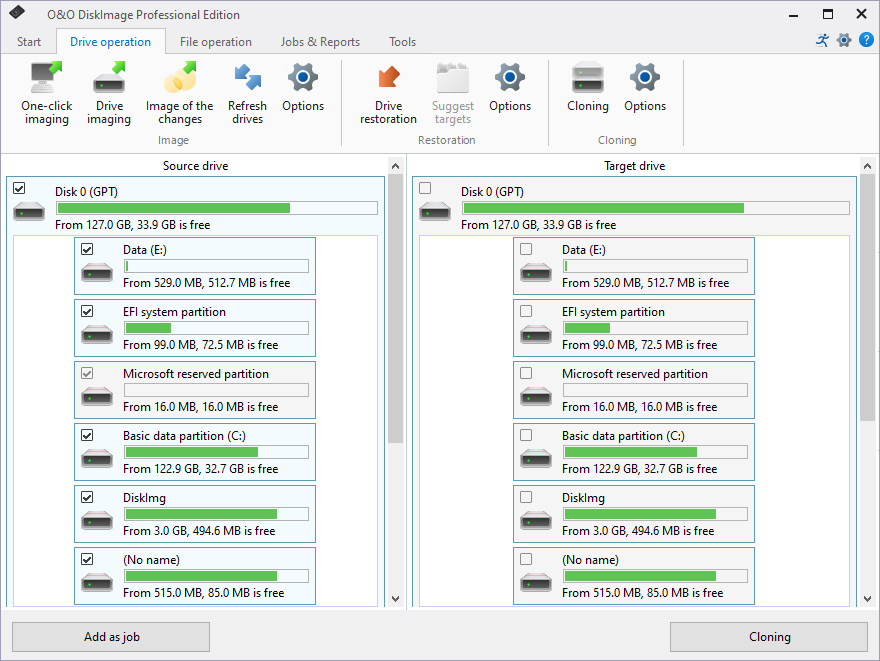
O&O DiskImage lets you carry out a system restore and to duplicate or clone an entire PC or hard drive. You can even restore this backup onto a computer whose hardware is different from the original machine. For examlpe, if you have changed a motherboard on the target machine or have bought a brand new PC and want to restore an old backup onto it.
This O&O software combines features for both the home user and the IT expert in one single product. A whole range of default and user-defined options lets you create the backup scenario that suits you best. It also supports SSD drives and the latest UEFI System.
O&O DiskImage 22 Premium Features:
- Backup an entire computer with the push of a button
- Backup system and hard drives, clone drives and entire disks
- Brand new file-based backup: now twice as fast as ever before – backup and restore individual files and/or folders
- Direct creation of VHD/VHDX
- Monitoring and warning of security risks
- Incremental/differential backup: back up only the changes
- Easily restore files, folders, drives and disks
- System restore onto different hardware (M.I.R.)
- Create a Windows Boot system directly from within the program with driver integration
- Plug-and-play: Selected files and folders are automatically backed up and synchronized
- Variable pixel density settings: adjusts to the selected DPI setting of the connected monitor
- New and enhanced functions Control via Command Lines
Comprehensive VHD / VHDX functionality
With the new version 22 it’s possible to convert image files made with O&O DiskImage into Microsoft Virtual Hard Disc (VHDX as well as VHD) image files. This can be especially useful if someone wants to first “rehearse” migrating from Windows 10 to Windows 11 because you can do that using a virtual machine created on the current system.
The new O&O DiskImage can also create incremental and differential images of virtual drives. Combining or mounting these images is also possible. Whenever there’s a backup available, it only takes a few seconds to access any files. Work on the computer you can then continue without any loss of time or important data.
O&O DiskImage with its own recovery partition
Normally with a backup or imaging program you need to create a boot medium (USB) to boot up your system if something goes awry. This you have to either carry around or store somewhere safe in case disaster strikes.
Thanks to the integration into the system, the O&O DiskImage RecoveryPartition you can access immediately so that the last system image you can restore directly. Not only is this much more comfortable and quicker for the user, it also provides them with an extra level of security as this medium cannot get lost or damaged as easily as a “portable”, external one.
O&O DiskImage To Go
This new function automatically turns an external hard drive (or USB flash drive with enough storage space) into a boot medium and marks this disk as the preferred storage medium for future system backups. As soon as you then connect this external USB hard disk to your computer, O&O DiskImage automatically creates a backup. This makes it easy to create a recent backup.
Further functions:
All default and advanced features are in one single product
This backup software is the safest and easiest way to avoid losing important personal files! Options are available for both auto backup and manual settings. Thanks to a unique recovery system that includes additional system recovery tools combined with O&O DiskImage you’ll quickly be able to restore all your important data – even if the backup you’re using was created with an older O&O DiskImage version.
Backup entire PCs, hard drives or files with the push of a button
When you back up a PC, O&O DiskImage saves all personal files as well as hard drive information and individual settings. This not only protects irreplaceable files but, in a worst case scenario, also saves you the trouble of having to carry out a time-consuming new setup of programs and the Windows operating system. O&O DiskImage lets you back up an entire computer, system and hard drives or just individual files and folders. To make sure your backups are always up to date, we recommend creating them at short intervals from one another.
Quick and easy system restore – even onto different hardware
Restoring a backup is as easy as pie. All you have to do is start the program, select the backup you want to restore, and you’re off. Included with the software is our machine independent restoration which means your old backup can be transferred 1:1 onto a new machine. Hardware of a different make will be automatically recognized and Windows settings will be carried out by themselves.
Plug-and-play function
Anyone wanting to save data on an external hard disk has it even easier. Thanks to the integrated plug-and -play option, selected files and folders you can back up automatically. For example, an external hard disk is connected to the computer. This is ideal for users who forget to carry out regular backups or who don’t want to go through the trouble. Once configured, the auto backup function runs by itself.
Create a boot medium directly from within the program
O&O DiskImage can bring a system back to life immediately and with no installation required. It does so by way of a Boot Medium (USB Stick) which is based on the currently installed Windows system and which contains all the standard drivers required.
What’s New in DiskImage 22.6.1231:
Added
- NAS/Network Credential Management: Persistent NAS credential storage via Windows Credential Manager for seamless access to network backup locations
- NAS/Network Credential Management: Dedicated Network Credentials Dialog for entering and testing credentials when accessing network shares
- NAS/Network Credential Management: Automatic credential reuse for mount and restore operations on NAS/UNC paths
- NAS/Network Credential Management: Interactive prompt for NAS credentials when opening backup files on network shares
- Backup reports now display the initiation source (e.g., manual, scheduled, hotplug) for better traceability
- Support for more than 10 partitions and disks in backup and restore operations
- Pre-backup BitLocker readiness check to detect locked drives before backup starts
- Disk quota exhaustion detection with graceful error handling
- Automatic removal of orphaned backup set entries when no valid backup files or reports remain
Improved
- System Tray Application: Native implementation for improved system integration
- User Interface: Debounced and asynchronous path validation for file and folder selection controls
- User Interface: Restore buttons are now disabled when a deleted backup is selected
- User Interface: Refined estimated time remaining display for prolonged operations
- Scheduled Tasks: Improved compatibility with user account control
- Scheduled Tasks: Improved handling of expired one-time task recreation
- Performance: Reduced post-backup delay and optimized background processing
- Localization: Audited and harmonized all localizations across resource files and supported languages
- Localization: Improved finalization progress text translations for all languages
- Architecture: Improved structure and reusability of components
- Recovery Environment: Ensured temp path existence in WinPE/RE environments
Fixed
- Restore operations: Fixed crash when restoring VHD images
- Restore operations: Fixed errors when navigating between VHD images
- Fixed restore dialog displaying incorrect partition list for selected backup files
- Fixed folder structure loss for OBK file backups in restore file selection
- Backup operations: Fixed System.Threading.AccessControl assembly load failure on USB backup
- Backup operations: Fixed error caused by dependency version mismatch
- Licensing: Fixed FortressMode (Windows RE) overriding normal license settings
- Drive detection improved: Label-only fallback is now used only when detection is ambiguous
- Fixed crash in browse dialogs when NAS/UNC paths are inaccessible
- Improved error messages for invalid backup drives
- Enhanced logging for RAW/unknown drive filtering
Homepage – https://www.oo-software.com
Supported Operating Systems: Windows 10, 11 (64-bit).
Size: 87.2 MB
DOWNLOAD O&O DiskImage 22.6.1231 Premium Trial 64-bit
DOWNLOAD O&O DiskImage 22.1.249 Pro Update 64-bit
DOWNLOAD O&O DiskImage 22.0 Build 191 Pro Trial 64-bit
BUY NOW O&O DiskImage 22 Premium
BUY NOW O&O DiskImage Server/ Professional
BUY NOW O&O PowerPack
Contains DiskImage Pro, Defrag Pro, SafeErase Pro and O&O AutoBackup Pro
BUY NOW selected O&O Software
TOP ALTERNATIVES
-
 FileRestorePlus is a quick and effective way to restore deleted or los...
 -
 CyberLink PowerBackup is the most robust data backup software which of...
 -
 Acronis Recovery for Microsoft Exchange provides granular restore from...
 -
 AOMEI Cyber Backup is the free, easy and centralized cross-platform En...
 -
 Retrospect Backup provides complete protection for every major operati...
 -
 R-Photo is a free utility for non-commercial recovery of photos and vi...
 -
 Acronis Backup for Server 11.7 is the leading backup and recovery for ...
 -
 Aiseesoft Data Recovery is the powerful data recovery tool can help yo...
 -
 WinfrGUI is a 100% FREE Windows data recovery utility with a GUI suppo...
Leave a Reply
0 Comments on O&O DiskImage 22.6.1231 Premium – 74% OFF