

VueScan 9.8.53 – Scanner Software

 (86 votes, 4.08 out of 5)
VueScan, the world’s most popular scanner software, is used extensively by photographers, home users, scanning services and corporations. It works with most high-quality flatbed and film scanners to produce scans that have excellent color fidelity and color balance.
VueScan is very easy to use, and also has advanced features for restoring faded colors, batch scanning and other features used by professionals.
This application changes nothing on your system, installs nothing in your system and all other scanner software will continue to function.
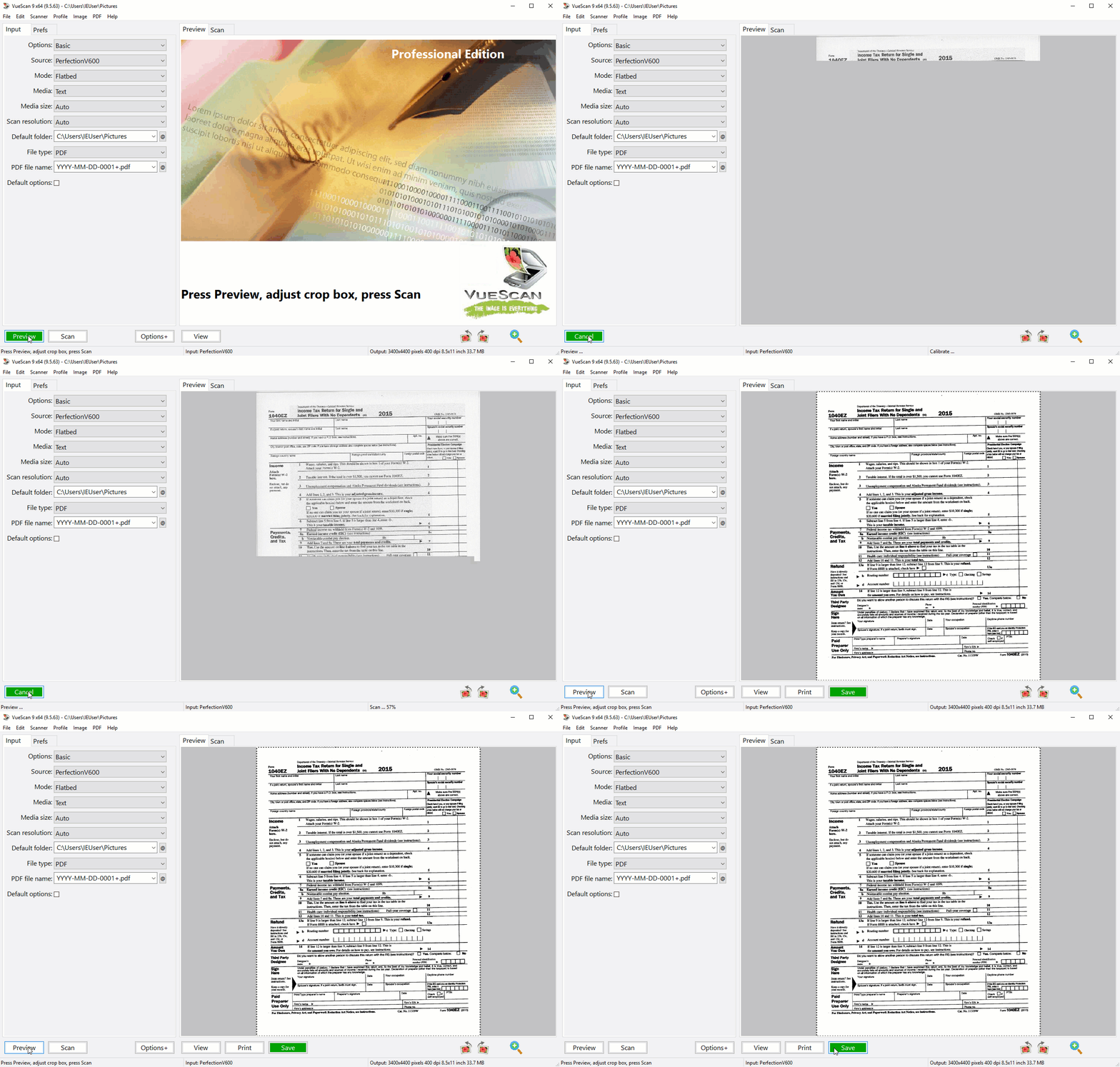
VueScan can output scanned documents, photos, and film in PDF, JPEG, TIFF formats. It can also recognize text using OCR and create multi-page PDFs using flatbed scanners and scanners with automatic document feeders. .
Accessing your WiFi enabled scanner has never been easier. The Mobile Edition allows you to seamlessly scan documents and photos straight to your iPhone, iPad, or iPod Touch from HP, Canon, and Epson WiFi printer/scanners. In addition to sending via Email and saving to the Photos App, Vuescan Mobile allows you to save scanned images to your favorite iOS apps. That can open PDF or JPEG files such as iBooks, Dropbox, GoodReader, Evernote, etc.
VueScan is a replacement for the software that came with your scanner. It is compatible with 6500 scanners from 42 scanner manufacturers.
VueScan Scans:
Documents
- Scan with Flatbed and Automatic Document Feeders (ADF)
- Scan to PDF (Single and Multipage)
- Optical Character Recognition (OCR)
- Automatic Color Detection
- Small document file sizes
- Automatic document deskewing
Photos
- Scan with Flatbed and Automatic Document Feeders (ADF)
- Scan to JPEG or TIFF
- Preset photo sizes
- Scan multiple photos on the flatbed
- Automatic file naming
Film and Slides
- Works with almost all film/slide scanners
- Scan to JPEG/TIFF/RAW
- Infrared Dust Removal
- Color correction
- IT8 Calibration
- Photoshop Integration
What’s new in version 9.8.53:
- Improved ‘File | Stitch images…”
- Added ‘File | Touch up…” to use AI to touch up parts of scans
- Added ‘Touch Up’ button (next to ‘View’ button)
- Slightly reduced size of buttons
- Improved support for encrypted communication with eSCL (Mopria) scanners
- Improved ‘Crop | Crop size’ option
- Fixed problem with color space with some kinds of B/W files
- Fixed problem with some kinds of PNG and JPEG-XL files
- Fixed problem with film eject on PIE PrimeFilm XA Plus
- Fixed problem with Fujitsu ScanSnap iX1600
- Fixed problem with Ricoh ScanSnap iX2400
- Fixed problem with Ricoh ScanSnap iX2500
- Fixed problem with some Brother scanners
- Fixed problem with some Genesys Logic scanners
- Fixed problem with crashes
- Removed support for Canon DR-M1060 on macOS (will add back once working)
Homepage – https://www.hamrick.com
Supported Operating Systems: Windows 7, 8, 8.1, 10, 11 (64-bit).
VueScan supports more than 2400 different scanners on Windows, 2100 scanners on macOS and 1900 scanners on Linux.
Please note that not all scanners work with all operating systems or SCSI/USB/Firewire interfaces, but most combinations are known to work. The best way to find out for sure if VueScan works with your scanner, operating system and interface is to download the trial version of VueScan from www.hamrick.com.
On Mac OS X, VueScan works with most USB to SCSI converters, including the Adaptec USBXchange and USB2Xchange. VueScan also works with most Firewire to SCSI converters. You don’t need to install any vendor software to get this to work. Only one SCSI device per converter is supported, and you should use SCSI ID 0 with USB to SCSI converters.
TOP ALTERNATIVES
-
 Microsoft Office 2010 Service Pack 2 (SP2) contains new updates which ...
 -
 Adobe Reader 10 software is the global standard for electronic documen...
 -
 Soda PDF Professional is the all-in-one PDF solution that allows you t...
 -
 EmEditor is a fast, lightweight, yet extensible, easy-to-use text edit...
 -
 OpenOffice 4 the product is a multi-platform office productivity suite...
 -
 Ashampoo PDF Pro is the complete solution to manage and edit your PDF ...
 -
 Word to PDF Converter is the fast, affordable way to create profession...
 -
 Cool PDF Reader is FREE light-weight PDF viewer for anyone! This viewe...
 -
 PDF-XChange Viewer is an alternative viewer for PDF files that enables...
Leave a Reply
1 Comments on VueScan 9.8.53 – Scanner Software
-
Guest
