

Cerberus FTP Server 2026.2



 (20 votes, 3.75 out of 5)
Cerberus FTP Server is a secure and reliable file transfer solution. For demanding IT professionals, featuring advanced SSH, SFTP and FTPS security with the flexibility your business needs.
Provides industrial strength secure SSL/TLS encryption and powerful FTP server performance without sacrificing ease-of-use. Designed to use very little CPU and memory, Cerberus features a user-friendly interface that can be easily hidden or accessed from the system tray.
The server is able to listen for connections on multiple interfaces (Multi-homed PCs), integrate with the Windows NT user database or Active Directory. Moreover it able to run as an NT service, resume failed transfers. Also offers an easy-to-use manager for controlling user access to files and file operations. Connection limit, timeout, and IP access you can control by the administrator as well as a variety of other settings.
In addition, Cerberus FTP Server offers statistics on connections as well as robust logging capabilities.
Cerberus FTP Server Features:
- Powerful SFTP Server. FTP, FTP/S, SSH SFTP, and HTTP/S web client access plus Event Notification. Automated Processing. Auditing and Reporting, and Ad Hoc File Transfers.
- Confidence. Robust file transfer integrity checking using strong checksums based on SHA-512, SHA-256, or SHA-1 cryptographic hashes
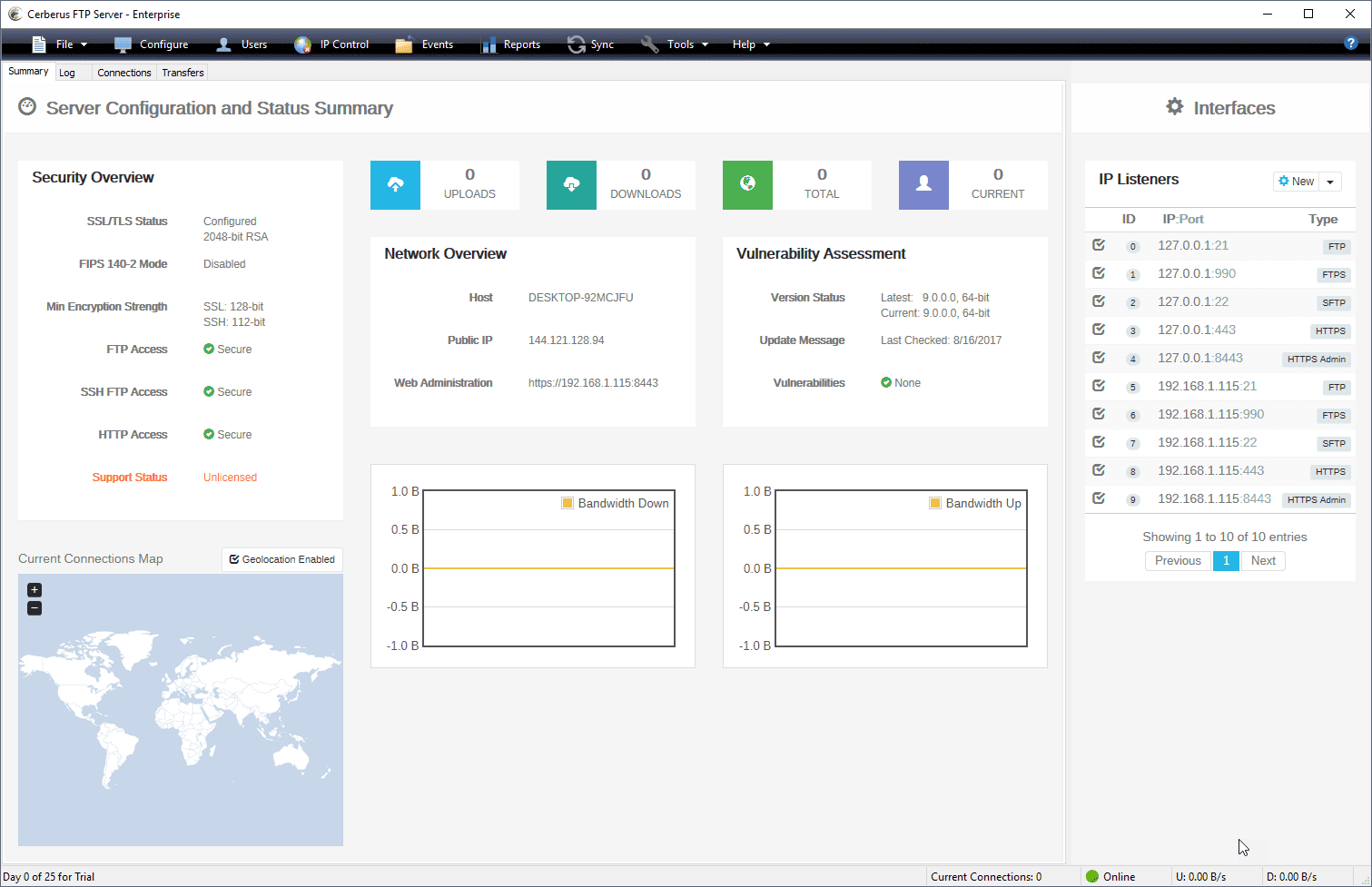
- Security: Added Protection against Intrusion. Configuration and Security Summary. Specify SSL ciphers to include or exclude. Restrict login by protocol. Password Policy Settings
- IP Whitelist and Blacklist, Automatic Account Lockout. Temporary User Accounts. AD FTP Security Groups Certificate Revocation Lists (CRLs). Client Certificate Verification. SSH2 Public Key Authentication
- HIPAA Compliant, FIPS 140-2 Validated. Exceeds industry standards with FIPS 140-2. Also provides the necessary access controls to meet compliance regulations. Ensures that data is not accessed by unauthorized users, and audits all commands and file access
- Manage and authenticate user accounts from built-in users and groups, Active Directory and LDAP and control authentication order priority with the new authentication chaining control.
- Create custom Virtual Directories for individual Active Directory and LDAP users.
- Enhanced performance on Windows Server. Low memory utilization, native 64-bit, and full IPv6 support.
- Logging and Auditing. Rolling log files with configurable size limits, Syslog Integration, detailed TLS/SSL cipher and bit strength per connection. Automatic logging of all commands and file access provides full audit trails.
- Detailed Statistics. Maintains statistics information about connections and file transfers. Allows creation of detailed reports of server usage.
- Superior Manageability. SOAP control API, Windows Service Support and support for Microsoft’s Hyper-V and VMWare’s ESX platforms.
- Maintain full access to the UI when running as a service
- Administrators can use the auto-blocking feature. It helps to prevent DoS (Denial of Service).
- IP Manager CIDR support
Cerberus FTP Server Other Features:
- Simultaneous FTP, SFTP, and FTPS for a single interface
- Custom Virtual Directories for individual Active Directory and LDAP users
- Require Secure Connections on a per user basis
- Password Policy Settings
- Automatic Account Lockout
- IP Manager CIDR support
- Specify SSL ciphers to include or exclude
- Support for RSA, DSA, and Elliptical Curve public and private keys
- Support for Ephemeral Diffie-Hellman key exchange
- Block FXP and reserved ports for PASV connections
- Require Active Directory Security Group Membership
- UTF-8 – Display filenames in foreign languages with their native charset
- Taskbar icon control and status indicator
- Connections limit and timeout controls
- Transfer and connection statistics
- Hidden server mode (Hides server window)
- Fine-Grained Directory Access Restrictions
- IPv6 Support
Changes in Cerberus FTP Server 2026.2 (2026-05-26):
Enhancements
- Welcome acknowledgement bypass for public sharing: Admins can now set up the option to bypass the manual “Welcome” screen for public share links in Server Manager →Listeners by checking/unchecking the box for “Show Welcome Message” and “Require Welcome Acknowledgement”.
- 3rd party library updates (canvasJS 3.15.8, gSOAP 2.8.142, OpenSSL 3.0.20): Upgraded background libraries to the newest versions and to address these vulnerabilities: CVE-2024-4227, CVE-2026-31790, CVE-2026-28387, CVE-2026-28388, CVE-2026-28389, CVE-2026-28390, CVE-2026-31789.
- DR license indicator: If admins have multiple Cerberus servers, the license page now clearly identifies which server is your backup/Disaster Recovery server.
Fixes
- MSSQL cipher column expansion: Expanded the reporting database cipher column to 255 characters to prevent long SFTP cipher strings from being cut off and triggering warnings.
- Weak TLS CCM8 remediation: Permanently disabled outdated 64-bit TLS CCM8 cipher suites to guarantee your file transfers use only the most secure, modern encryption.
- Web client file browser fix: Improved click behavior so selecting a file row no longer causes accidental downloads, reserving downloads strictly for clicking the filename link itself.
- Microsoft OAuth2 SMTP Fix: Resolved a false alarm system message that was incorrectly labeling secure Microsoft OAuth2 email configurations as an “insecure protocol.”
Changes in Cerberus FTP Server 2026.1 (2026-03-31):
New Features
- Cerberus has been upgraded to be compliant with FIPS 140-3 to future-proof your regulated environment and ensure seamless data protection. This change comes ahead of the September 2026 retirement of FIPS 140-2.
- Added support for ETM (Encrypt-Then-MAC) algorithms (hmac-sha2-256-etm and hmac-sha2-512-etm) to SFTP, hardening the server against modern vulnerabilities like the recent Terrapin attacks
- Banned usernames can no longer be requested as new native accounts.
- CSV user import now acknowledges blank passwords and requires admin confirmation prior to importing these users.
- HTTP/S listeners can now optionally remove the login prompt when SAML SSO is configured, streamlining authentication for SSO-only deployments. The login form is automatically displayed if SSO is unavailable to prevent user lockout.
- Upgraded cURL to 8.18.0 to address several low CVEs (CVE-2025-15224, CVE-2025-15079, CVE-2025-14819, CVE-2025-14524, CVE-2025-10966) as well as medium CVEs (CVE-2025-14017, CVE-2025-13034).
- Upgraded libssh2 to 1.11.1.
- Upgraded log4cxx to 1.6.1.
Improvements
- SSH/SFTP cipher, MAC, and key exchange algorithms are now displayed in order from most secure to least secure in the protocol security settings.
Fixes
- Long filenames now wrap in the file browser, instead of being truncated, for better readability.
- Server updates are no longer blocked when EULA changes are included; admin acceptance checkbox enables successful silent installations for all software and EULA updates.
- SSO users may now be deleted from the cache. A new ability to remove all inactive users from provisioning has been added.
- License expiration events now provide proactive alerts, allowing admins to configure automated email notifications up to one year in advance to prevent unexpected service interruptions.
- Local privilege escalation (LPE) vulnerability where BUILTIN\Users had write access to the update installers directory.
Homepage – https://www.cerberusftp.com
Supported Operating Systems:
- Windows Server 2016, 2019, 2022, 2025
- Windows 7, 8, 10, 11
TOP ALTERNATIVES
-
 Microsoft SQL Server 2019 brings innovative security and compliance f...
 -
 Microsoft SQL Server 2008 Express with Advanced Services is a free, ea...
 -
 WinGate Proxy Server is a sophisticated integrated Internet gateway an...
 -
 Xlight FTP server is a high performance and easy to use server with ve...
 -
 FileZilla Server is a free, open source server for Microsoft Windows. ...
 -
 BulletProof FTP Server 2019 is the most simple and powerful FTP Server...
 -
Microsoft SQL Server 2016 delivers breakthrough mission-critical capab...
-
Microsoft SQL Server 2008 lets your organization manage any data, any ...
-
 Microsoft Windows Server 2016 is the cloud-ready operating system. It ...
Leave a Reply
0 Comments on Cerberus FTP Server 2026.2