

Ashampoo Backup Pro 27.7.0 – from $16

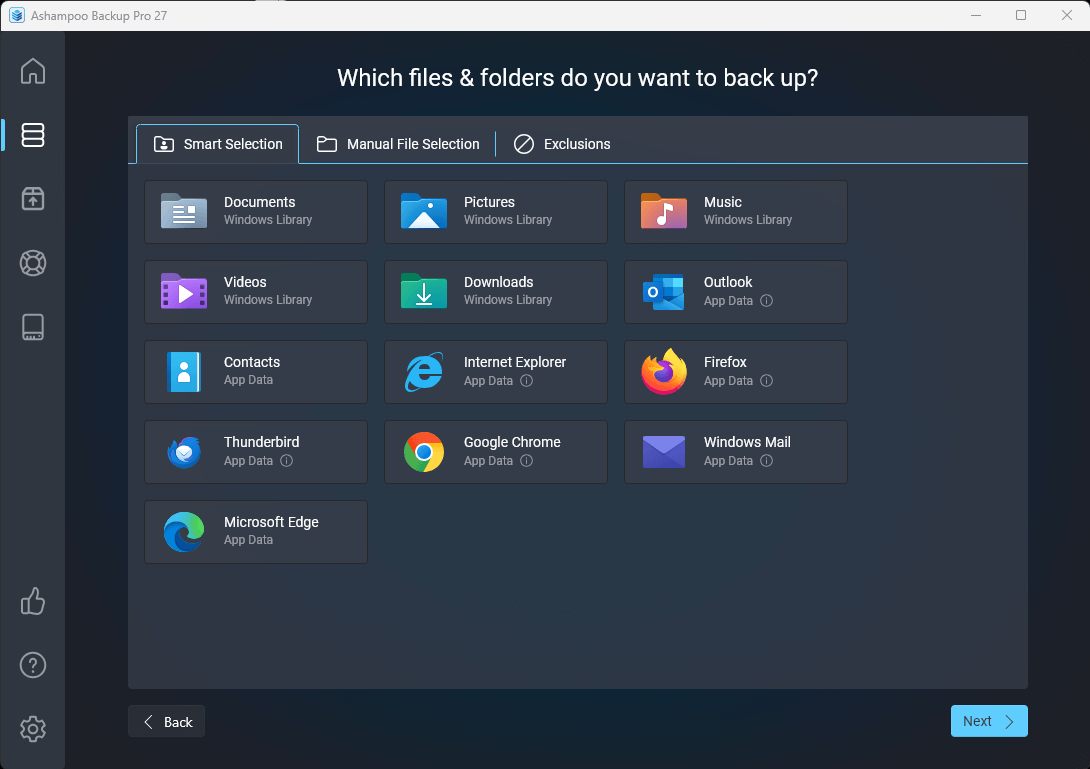
Ashampoo Backup Pro 27 automatically backs up files, drives, or entire systems to protect against data loss caused by hardware failure, malware, or user error. Backups can be stored locally, on external drives, within a network, or in the cloud, and can be fully or partially restored when needed. The new version introduces a completely redesigned user interface with a clearer structure, simplified plan creation, and an informative dashboard.
The new Backup Explorer provides direct access to backed-up files, while the modernized rescue system now also supports restoring individual files from image backups. Additional improvements include the new Check and Repair feature for drive analysis, enhanced BitLocker support, and up to 30% faster cloud backups.
The program will create backups fully automatically thanks to smart background technology that does not interfere with normal PC operation. For that, this Ashampoo software monitors the system load and only becomes active when enough resources are available.
BUY NOW Ashampoo Backup Pro 27 – from $16
Four selectable compression methods and strong encryption ensure space-efficient and secure backup archives. Users have total control over the storage location and medium, from traditional hard disks to online cloud services for maximum accessibility – and this applies to both individual files and entire disk partitions.
Additionally, Ashampoo Backup Pro supports uploads to multiple cloud providers, enabling the storage of individual files, folders, or entire partitions according to your needs. Restored backups can be accessed directly via Windows Explorer or the program interface. In case of an operating system failure, a rescue system allows safe booting and data restoration without loss.
This rescue system can be conveniently stored on a USB stick or DVD. The program includes self-monitoring features to ensure backup consistency through verification and can perform disk checks for functionality. Templates simplify backup creation with user-friendly presets.
Ashampoo Backup Pro 27 takes the fear out of viruses, ransomware, and hardware errors! Experience an easy to use well-designed but powerful backup solution. The new Ashampoo Backup Pro offers you all possible storage options: Back up single files or entire partitions to local drives or online storage providers. Backup software couldn’t get any easier. Just plug in a storage device and you’re good to go! In addition, the program is light on resources, gets out of your way and does all the heavy lifting in the background. Restoring your backups is super easy! Ashampoo Backup Pro even comes with a bootable rescue system to restore your system in the event of major system failure!
Ashampoo Backup Pro Highlights and Features:
- Simplified plan creation in just a few steps
- Unified system for easier plan management
- New side panel with log and report details
- Dashboard with statistics, SMART status, and error overview
- Direct file extraction without full restore
- Brand-new rescue system with modern interface
- Check & Repair with real-time drive analysis
- Up to 30% faster cloud saves
- Enhanced BitLocker support with Smartcard and TPM
- Dockable main window for flexible workspace layouts
- New dark mode
- Unified Backup Explorer for all backup types
- Restore individual files from backup images
- Queue function for multiple drive checks
- Support for system-wide HTTP proxies
- Significantly faster file-based backups
- Backup images open directly in Explorer – no more virtual drives
Real-time backups
Ashampoo’s new real-time backup technology tracks your most important folders for file changes and updates your backups accordingly–and you get to individually pick those folders! This means your files are kept safe automatically and it certainly takes the fear out of sudden crashes or system freeze-ups. Never again will you have to worry whether your current archives really include all of your latest files. It’s another step toward the perfect backup solution!
Rescue system based on the latest Windows
Ashampoo Backup Pro’s got your back when disaster strikes and your system crashes: Our Windows-based state-of-the-art rescue system can reboot your PC either from DVD or USB stick. Instead of a full Windows reinstall, you can then simply restore your previous system backup and return your PC to normal.
Bitlocker support – Unlock and use BitLocker-encrypted drives
Windows encrypts drives via BitLocker to protect them against unauthorized access. This makes it harder, sometimes even impossible, for backup software to access your files. Ashampoo Backup Pro not only sees your BitLocker-encrypted drives but can also access them to store your file archives. Naturally, the drives are not only accessible during normal operation but also through the rescue system!
Superior malware protection – No chance for ransomware, viruses, and worms
Your PC is under constant threat from all kinds of malware. A single wrong click, a security hole in your system, or an infected email is all it takes to trigger disaster! Antivirus programs can never detect and neutralize all malware. Experts believe 300,000 new threats are created and distributed every day. Ransomware that targets your wallet in return for access to your files is particularly prevalent. Backups are the only solution that offers 100% security. Once your system becomes infected, simply restore your backup and you’re in the clear again!
Store backups on the Storage Services
There’s no more limit to the number of supported cloud service providers! Another welcome addition is support for OneDrive Business / Office 365, Owncloud and Nextcloud. Now, you can work independently of your local storage devices! This not only applies to regular files but also includes entire drive backups! Dropbox, Deutsche Telekom, Google Drive, OneDrive, Strato, 1&1 and many others are also fully supported.
Changes in Ashampoo Backup Pro 27:
- Revamped User Interface: A completely redesigned interface offers maximum clarity and a more intuitive user experience, simplifying the process of creating and managing backup plans.
- Faster Performance: Cloud backups are up to 30% faster, and file-based backups also benefit from noticeably improved performance.
- Unified Backup Explorer: This new feature provides direct access to the contents of backup images, allowing users to extract or restore individual files without performing a full system restore or mounting a virtual drive.
- New Check & Repair Tool: A powerful tool for real-time drive analysis that scans, logs errors, and can immediately fix issues on multiple drives automatically.
- Enhanced BitLocker Support: Expanded support for BitLocker-encrypted drives, including all unlock methods like Smartcard and TPM, which are accessible during normal operation and through the rescue system.
- Brand-New Rescue System: A completely new, modern rescue system interface that provides step-by-step guidance and improved driver management for more reliable system recovery in emergencies.
- New Dashboard and Side Panel: The dashboard offers a comprehensive overview of backup statistics, drive health (SMART status), and errors. A new side panel provides quick access to logs and reports.
- Plug & Play Backups: External drives are automatically detected, and predefined backup plans run as soon as the device is connected, with no additional clicks required.
- Dark Mode: A new dark mode option for a flexible workspace layout.
- Support for System-wide HTTP Proxies: This ensures broad compatibility within different network environments.
Changes in Ashampoo Backup Pro 26:
- Fast two-step data protection with Easy Backup}
- Greatly improved performance and stability}
- Real-time backups
- State-of-the-art rescue system
- Plug & Play backups
- Bitlocker support
- Future-proof cloud support
- No strain on your system
- Full clarity with Backup Viewer
- All-round protection with hard disk checkups
Changes in Ashampoo Backup Pro 25:
- (NEW) Rescue system with vastly improved driver support
- (NEW) New handy real-time backup templates
- (NEW) Improved network connectivity during backup recovery
- (NEW) More details and better overview for backup plans
- (NEW) Additional settings to limit email-based reporting by severity
- (IMPROVED) Modern rescue system based on the latest Windows
- (IMPROVED) Rescue system with updated drivers and maximum safety
Homepage – https://www.ashampoo.com
Supported Operating Systems: Windows 10, 11, 11 (ARM).
Languages: Belorussian, British English, Bulgarian, Catalan, Chinese (simplified), Chinese (traditional), Czech, Danish, Dutch, English, Finnish, French, German, Hungarian, Italian, Japanese, Korean, Latvian, Norwegian, Norwegian Nynorsk, Polish, Portuguese, Portuguese (Brazilian), Rumanian, Russian, Serbian, Serbian, Slovakian, Slovenian, Spanish, Spanish (Argentina), Swedish, Turkish

TOP ALTERNATIVES
-
 Acronis Ransomware Protection is a free tool, that delivers proven, po...
 -
 Undelete 360 is a powerful data recovery software that can effectively...
 -
 GoodSync 12 is reliable and easy to use file synchronization and file ...
 -
 Veritas System Recovery (formerly Symantec System Recovery) is a syste...
 -
 Acronis Backup for VMware – simple and fast solution for protect...
 -
 Acronis Backup for PC provides disk-based backup and disaster recovery...
 -
 Glarysoft File Recovery is a powerful file undelete solution for FAT, ...
 -
 Restorer Ultimate is a new generation of data recovery featuring a new...
 -
 Disk Doctors Windows Data Recovery is more then an simple file undelet...
Leave a Reply
0 Comments on Ashampoo Backup Pro 27.7.0 – from $16