

Cerberus FTP Server 2026.3

Cerberus FTP Server is a secure and reliable file transfer solution. For demanding IT professionals, featuring advanced SSH, SFTP and FTPS security with the flexibility your business needs.
Provides industrial strength secure SSL/TLS encryption and powerful FTP server performance without sacrificing ease-of-use. Designed to use very little CPU and memory, Cerberus features a user-friendly interface that can be easily hidden or accessed from the system tray.
The server is able to listen for connections on multiple interfaces (Multi-homed PCs), integrate with the Windows NT user database or Active Directory. Moreover it able to run as an NT service, resume failed transfers. Also offers an easy-to-use manager for controlling user access to files and file operations. Connection limit, timeout, and IP access you can control by the administrator as well as a variety of other settings.
In addition, Cerberus FTP Server offers statistics on connections as well as robust logging capabilities.
Cerberus FTP Server Features:
- Powerful SFTP Server. FTP, FTP/S, SSH SFTP, and HTTP/S web client access plus Event Notification. Automated Processing. Auditing and Reporting, and Ad Hoc File Transfers.
- Confidence. Robust file transfer integrity checking using strong checksums based on SHA-512, SHA-256, or SHA-1 cryptographic hashes
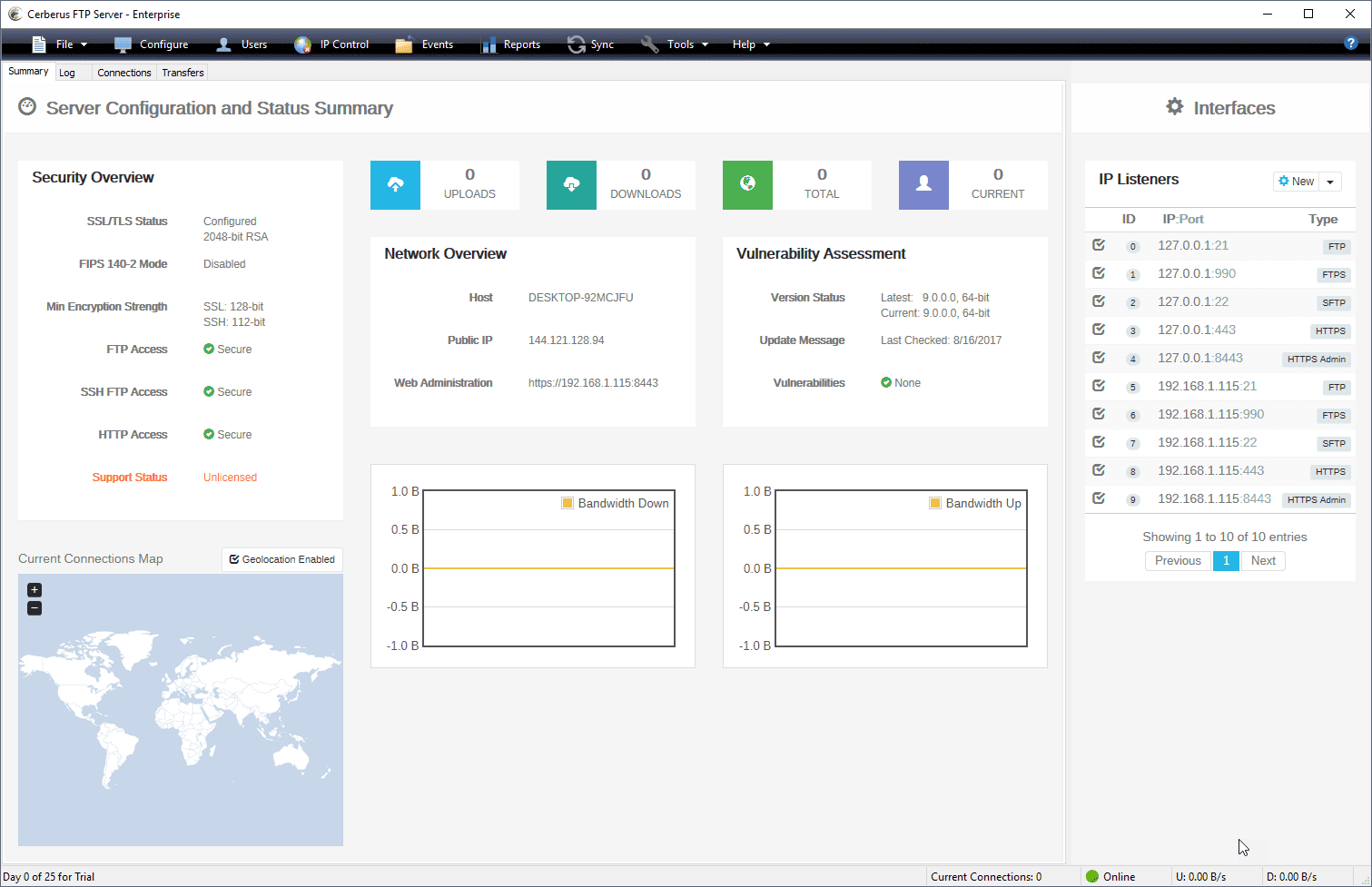
- Security: Added Protection against Intrusion. Configuration and Security Summary. Specify SSL ciphers to include or exclude. Restrict login by protocol. Password Policy Settings
- IP Whitelist and Blacklist, Automatic Account Lockout. Temporary User Accounts. AD FTP Security Groups Certificate Revocation Lists (CRLs). Client Certificate Verification. SSH2 Public Key Authentication
- HIPAA Compliant, FIPS 140-2 Validated. Exceeds industry standards with FIPS 140-2. Also provides the necessary access controls to meet compliance regulations. Ensures that data is not accessed by unauthorized users, and audits all commands and file access
- Manage and authenticate user accounts from built-in users and groups, Active Directory and LDAP and control authentication order priority with the new authentication chaining control.
- Create custom Virtual Directories for individual Active Directory and LDAP users.
- Enhanced performance on Windows Server. Low memory utilization, native 64-bit, and full IPv6 support.
- Logging and Auditing. Rolling log files with configurable size limits, Syslog Integration, detailed TLS/SSL cipher and bit strength per connection. Automatic logging of all commands and file access provides full audit trails.
- Detailed Statistics. Maintains statistics information about connections and file transfers. Allows creation of detailed reports of server usage.
- Superior Manageability. SOAP control API, Windows Service Support and support for Microsoft’s Hyper-V and VMWare’s ESX platforms.
- Maintain full access to the UI when running as a service
- Administrators can use the auto-blocking feature. It helps to prevent DoS (Denial of Service).
- IP Manager CIDR support
Cerberus FTP Server Other Features:
- Simultaneous FTP, SFTP, and FTPS for a single interface
- Custom Virtual Directories for individual Active Directory and LDAP users
- Require Secure Connections on a per user basis
- Password Policy Settings
- Automatic Account Lockout
- IP Manager CIDR support
- Specify SSL ciphers to include or exclude
- Support for RSA, DSA, and Elliptical Curve public and private keys
- Support for Ephemeral Diffie-Hellman key exchange
- Block FXP and reserved ports for PASV connections
- Require Active Directory Security Group Membership
- UTF-8 – Display filenames in foreign languages with their native charset
- Taskbar icon control and status indicator
- Connections limit and timeout controls
- Transfer and connection statistics
- Hidden server mode (Hides server window)
- Fine-Grained Directory Access Restrictions
- IPv6 Support
Changes in Cerberus FTP Server 2026.3.0 (2026-08-26):
- New Feature: OAuth 2.0 authentication support for Google Workspace and Microsoft Entra ID as an authentication type for SMTP Mail.
We have added new OAuth 2.0 authentication methods for the SMTP Mail Server target, offering a more secure, token-based approach as an alternative to storing traditional usernames and passwords by leveraging your organization’s existing cloud identity providers.
Google Workspace Email: You can now integrate with Google Workspace to send email via smtp.gmail.com using OAuth 2.0. This feature leverages Service Account impersonation, ensuring Cerberus authenticates with a secure, machine-level identity.
Microsoft Office 365 Email: Integration with Microsoft Entra ID enables secure email communication through Office 365. This non-interactive OAuth 2.0 method uses application credentials, eliminating the need to store user passwords for authentication.
- New: Search by description for local user management in User Manager and Group Manager.
- New: UNC paths supported in event rules for get a file and send a file actions
- Improved: Enhancement on Web Client Security on the Account Request page.
- Improved: Update of X-XSS-Protection header to align with modern browser standards.
- Improved: cURL Update to 8.16.0 Addresses CVE-2025-5399, CVE-2025-9086, and CVE-2025-10148.
Changes in Cerberus FTP Server 2026.2.2 (2026-07-15):
-
Fix
- Addressed CVE-2026-55200, an out-of-bounds write vulnerability in libssh2 that could allow a malicious SSH server to execute arbitrary code on a connecting client. libssh2 1.11.1 has been patched and libcurl 8.18.0 rebuilt against the patched library. All customers are encouraged to upgrade immediately.
NOTE: False positives on security scanners may occur post-upgrade. Because libssh2 has not yet published an official patch release, version-based scanners may continue to flag it as “vulnerable”. This is a false positive as the vulnerability has been patched once the upgrade has been performed.
Homepage – https://www.cerberusftp.com
Supported Operating Systems:
- Windows Server 2016, 2019, 2022, 2025
- Windows 7, 8, 10, 11
TOP ALTERNATIVES
-
 Microsoft Exchange Server 2019 lets you accomplish more with rich Outl...
 -
 MDaemon is a reliable and secure mail server that does not require exp...
 -
 Microsoft SQL Server 2008 lets your organization manage any data, any ...
 -
 Windows Server 2012 is the Cloud OS that offers businesses and service...
 -
Microsoft SQL Server 2017 delivers industry-leading OLTP, the least v...
-
 Microsoft Windows Server 2016 is the cloud-ready operating system. It ...
 -
Windows Server 2022 is the cloud-ready operating system. It delivers n...
-
 WinGate Proxy Server is a sophisticated integrated Internet gateway an...
 -
Microsoft SQL Server 2014 is foundation of Microsoft’s comprehensive...
Leave a Reply
0 Comments on Cerberus FTP Server 2026.3