

O&O DiskCommander 5.1.1020 Premium
O&O DiskCommander is a specialized Windows analysis tool that acts as a “detective” for identifying storage hogs and visualizing disk usage. It enables users to scan internal/external drives, SSDs, and O&O DiskImage backups to reclaim space, featuring a familiar Windows Explorer interface for deep, non-destructive data analysis.
BUY NOW O&O DiskCommander Premium – $29.95
66% OFF (until Feb 19, 2026) Coupon Code: 3N7-M4S-TFJ
The software helps to quickly identify memory guzzlers, create order and reclaim valuable storage space in a targeted manner – for more efficient work with Windows.
O&O DiskCommander Key Features and Capabilities:
- Deep Data Analysis: Provides detailed insights into file systems (NTFS/FAT), identifying which files are consuming memory or growing rapidly.
- Backup Inspection: Specifically allows loading and examining O&O DiskImage files without needing to restore them first.
- Identifies “Memory Guzzlers”: Helps pinpoint, visualize, and delete large, old, or rarely used files to free up space.
- Diagnostic Tool: Designed for IT professionals to inspect disk layouts and file integrity after failures.
- No Installation Required: The tool can run without being installed on the system.
O&O DiskCommander is ideal for maintaining system performance, managing large volumes of data, and performing forensic-style analysis on storage devices.
Loading and analyzing O&O DiskImage backups
- Backups from O&O DiskImage can be loaded and evaluated directly. This allows memory usage to be checked even in backups without having to restore the backup.
Detailed visual storage space analysis
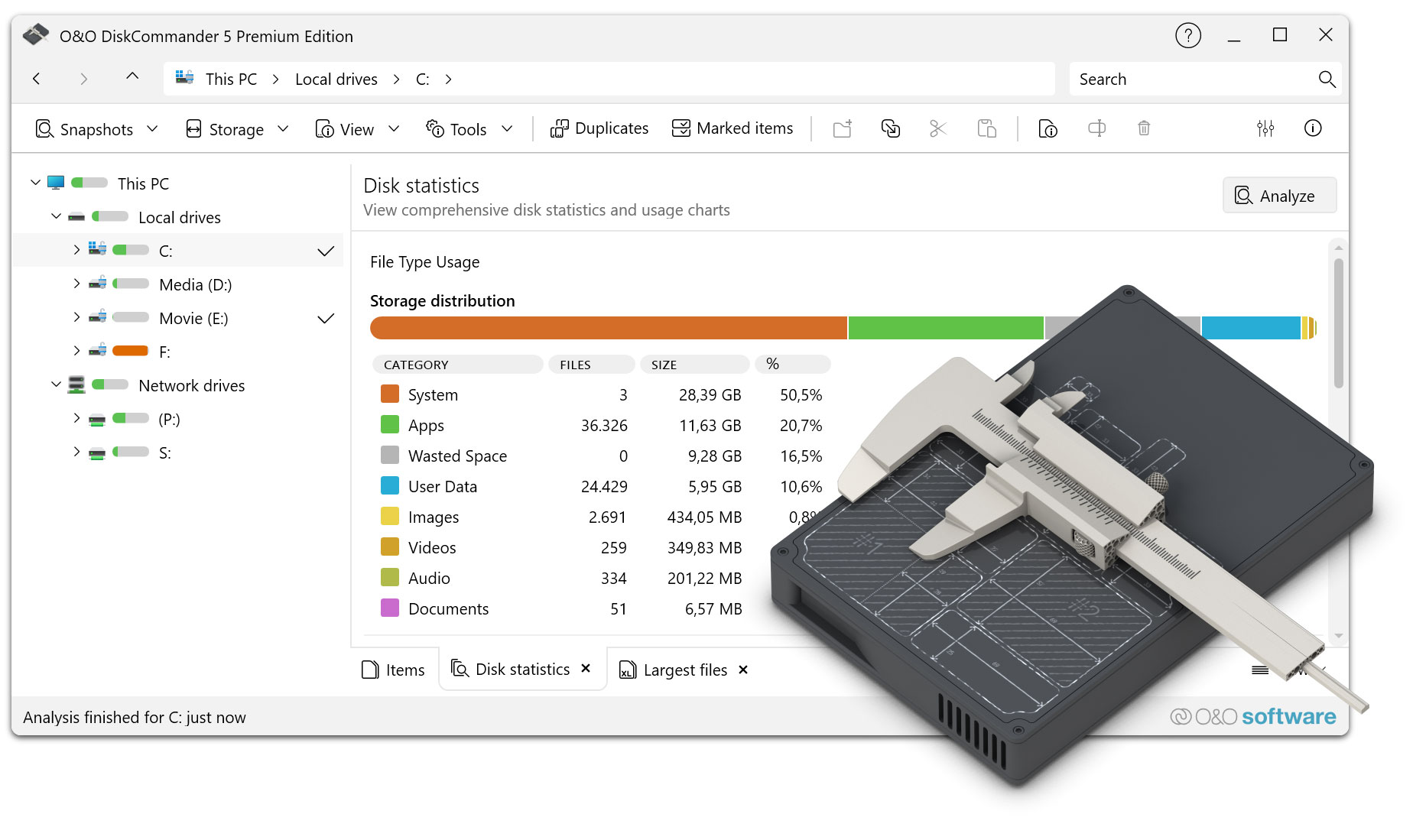
- O&O DiskCommander analyzes data carriers completely and displays the memory distribution graphically. Files and folders are visualized in proportion to their size, so that memory hogs can be detected immediately – even on very large drives.
Transparent display of disk usage
- Storage space usage is clearly broken down by drives, folders, subfolders, and file types. This makes it clear at a glance where storage space is being consumed and where there is potential for optimization.
Quickly identify large and space-intensive files
- Large, old or rarely used files can be tracked down in a targeted manner. Filter and sorting functions help to systematically find memory hogs – regardless of where they are located on the data carrier.
Hierarchical analysis of the folder structure
- The complete folder structure of a drive is analyzed and displayed hierarchically. Storage consumption can be tracked down to the file level – ideal for a targeted cleanup strategy.
Analysis of internal and external data carriers
- O&O DiskCommander supports internal hard drives, SSDs and external data carriers such as USB drives or external hard drives. This makes the tool also suitable for the analysis of outsourced or archived databases.
Scan without content modification (secure analysis)
- Data carriers and storage media can be checked without changing content. This means that data remains untouched at all times – ideal even for sensitive or productive systems.
Detailed analysis of hard drives, partitions and file systems
- In addition to the file view, O&O DiskCommander provides a deeper evaluation of data carriers, partitions and file system structures – for precise diagnostics and better decisions when cleaning up.
Analysis of snapshot files (even without a connected drive)
- Snapshot files can be evaluated even if the associated drive is not currently connected to the computer – practical for archive media, offline drives or remote data carriers.
Finding Duplicates
- Duplicate files are reliably detected. In this way, unnecessary memory consumption can be quickly reduced and data inventories can be brought to order.
Marking files across directory and partition boundaries (batch processing)
- Files can be collectively marked across drives and then edited in one step – efficiently, especially with large amounts of data.
Warning when a set storage threshold is reached
- If desired, O&O DiskCommander automatically warns as soon as a defined storage limit is reached – in order to avoid bottlenecks at an early stage.
Export and import of analysis files
- You can save, export, and re-import analysis results later, making it ideal for documentation, comparisons, or team collaboration.
Detailed logging
- Processes and analysis results can be logged in detail – for traceability, reporting and compliance requirements.
Intuitive navigation and powerful filters
- By sorting and filtering by size, name, type, or location, you can quickly narrow down relevant files. The intuitive operation enables efficient work even with large amounts of data.
Direct file and folder actions
- Found files and folders can be opened, checked or specifically deleted directly from O&O DiskCommander in Windows Explorer. This saves time and avoids unnecessary detours.
Fast analysis of even large data carriers
- The analysis is high-performance and reliable – even with large data carriers with many files and complex folder structures.
No automatic changes to the system
- O&O DiskCommander works purely analytically. Changes to the system are made only after the user’s explicit decision – for maximum security and control.
More overview, more efficiency in everyday work
- Through clear visualization and transparent analyses, O&O DiskCommander helps to use storage space efficiently, create order and noticeably improve daily work with Windows.
Changes in O&O DiskCommander 5.1.1020 (2026-02-03)
Added:
- File Type Usage Tab
- New main navigation tab displaying grouped statistics and analysis on disk usage by file type categories (Images, Videos, Audio, Documents, Apps, System, User Data)
- Live updates during analysis
- Full localization support
- Context-Sensitive Online Help
- Access via F1 key or help button
- Displays documentation relevant to the current view or active tab
- Paste Security for Read-Only Volumes
- Prevents pasting files into read-only volumes such as mounted disk images, backup volumes, or analysis snapshots
- Password-Protected Disk Image Support
- Added password dialog for password-protected disk images
- Tree Map Double-Click Navigation
- Double-click folders in the Tree Map to navigate into them
- Double-click files to open them
- Intuitive navigation similar to File Explorer
Changed:
- Tree Map Accessibility Improvements
- Improved color palette with higher contrast per level
- Dark mode adaptation
- WCAG-compliant text contrast
- UI Terminology Updates
- “Statistics” replaces “Storage”
- “Overview” replaces “Disk statistics” across the UI and localizations
- Scan Controls and Status Display
- Updated scan controls and header buttons
- Improved reflection of current state and background activity
- Memory Management
- Optimized internal memory management
Fixed:
- Fixed Open Files enumeration where file handles were skipped
- Fixed memory leak in display logic
- Paste, move, and delete operations now properly check deletable/moveable status of marked items
- Warning is shown if only a subset of selected items can be processed
- Status bar and file lists now correctly update after background actions and navigation
- Various UI glitches fixed in Tree Map, File Type Usage, and other views
Info:
- Compatible with Windows 10 and Windows 11; x86, x64, and ARM architectures
- Available in German, English, French, Italian, Spanish, Russian, Japanese, and Simplified Chinese
Homepage – https://www.oo-software.com/en/oodiskcommander
System Requirements:
- Windows 10 or Windows 11 – all editions
- Windows Server 2025
- Microsoft .NET 8 Runtime (provided with installation)
- At least 100 MB of free hard disk space
- At least 2 GB of RAM (4 GB recommended)
- Internet connection required
Size: 65.1 MB
DOWNLOAD O&O DiskCommander Trial
TOP ALTERNATIVES
-
 Ultimate Boot CD lets you run USB-based diagnostics tools from CDROM d...
 -
 Paragon Partition Manager Free Community Edition is designed to organi...
 -
 ActiveSMART is an award winning hard disk status analyzer and failure ...
 -
 Hiren’s BootCD PE (Preinstallation Environment) is created for t...
 -
 HDD Regenerator – the unique software program for regeneration o...
 -
 DiskGenius software is the professional all-in-one solution for data r...
Leave a Reply
0 Comments on O&O DiskCommander 5.1.1020 Premium