

Q-Dir 12.63 – The Quad File Explorer


 (58 votes, 3.98 out of 5)
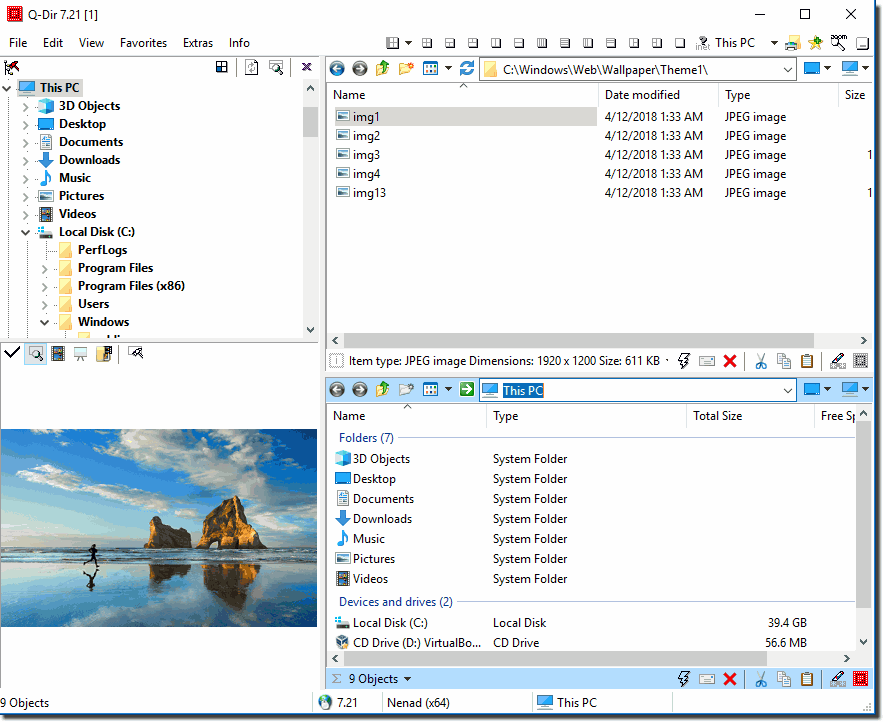
Q-Dir (the Quad Explorer) makes your files and folder easy to manage, as an installed or portable Windows program. Fast and easy access to your hard disks, network folders, USB-Stiks, floppy disks and other storage devices.
Q-Dir is a good file manager with an amazing Quadro-View technique. You don’t have to renounce the usual, Drag and Drop, all Views, and other functions of your system.
This application is one of those alternatives, as this application has been specifically developed to serve as a replacement for the default Windows file management utility. This tool allows users to browse up to four locations in the same time.
It also supports tabbed browsing, which means one of the panels can open multiple folders at the same time and organize them in tabs, in the same way Internet browsers do with webpages.
Plus, Q-Dir has several extras, thus allowing you to customize the application a little bit, especially when it comes to layout and the way it looks.
The program does not have to be installed and can be executed easily from the desktop, and can be carried on a small usb-stick or other memory device.
Some Q-Dir features:
- Favorites: Quick access to most often used folders.
- Drag and Drop: Move files by dragging in Q-views, and other programs such as MS Explorer.
- Clipboard: Copy/ Paste between the Q-Dir directory views, and other programs such as MS Explorer.
- Folder-Type: ZIP-, FTP-,cabinet-,network-, system – folders, shortcuts …
- Views: Large icons, tiles, list, detail, thumbnail (Vista: extra large symbols) .
- Export: to XLS, CSV, TXT, HTML.
- Popup Menus: Desktop, My Computer.
- Screen magnifier: anything on the screen can be enlarged.
- Color Filter: Different colors for different item types (e.g. *.log;*.txt).
- Highlight-Filter: Effective way for fast items highlighting.
- File-Filter: Allows for quick and easy filtering of the items.
- Columns: All columns support, and save function .
- Quick-Link’s: For fast folder access.
- Folder-Select: Fast & flexible folder selection address-bar/ desktop menu/ my-computer menu/…
- Multi-INI: Several INI files
- Tree-View: Simple and quadruple.
- Preview: Allows a quick preview
Changes in version 12.63 (2026-05-10):
- Updated language files in Quad File Explorer; minor corrections in the File Explorer under Windows 11 for improved data management.
Changes in version 12.62 (2026-04-30):
- Minor adjustments for the next MS Windows 11 build.
- Update of the Quad File Explorer language files.
Changes in version 12.61 (2026-04-13):
- Minor bug fixes in Quad File Explorer for Windows
- Q-Dir language files updated
Changes in version 12.59 (2026-04-13):
- Minor bug fixes for keyboard shortcuts in Quad File Explorer for Windows
- Q-Dir language files updated
- New language in Q-Dir: Hebrew
Changes in version 12.57 (2026-04-11):
- Minor bug fix in the keyboard shortcut.
- Q-Dir’s language files have been updated.
Changes in version 12.56 (2026-04-10):
- Improvements to the shell folder menus (address bar, quick links, favorites)
- Similarly, Ctrl+VK_LEFT and VK_RIGHT allow switching between file explorer tabs using keyboard shortcuts.
Changes in version 12.55 (2026-03-28):
- General improvements to Quad File Explorer for all Windows operating systems
- Optimized usability and improved operation for greater convenience.
- New option: Close button for tabs
- Tabs can now be closed directly using a visible close button.
- Activate under: Menu – Tools – Tabs – Show Close Button
Homepage – https://www.softwareok.com
Supported Operating Systems:
- Windows 7, 8, 8.1, 10, 11 (32-bit, 64-bit).
- Windows Server 2012, 2016, 2019, 2022.
Size: 841 KB
DOWNLOAD Q-Dir Installer
DOWNLOAD Q-Dir Installer x64
DOWNLOAD Q-Dir Portable
DOWNLOAD Q-Dir Portable x64
TOP ALTERNATIVES
-
 Kristanix File Renamer Turbo (previously known as File Renamer Deluxe)...
 -
 Directory Opus is a simplest file manager, a utility program which pre...
 -
 XYplorer is a multi-tabbed file manager for Windows, featuring a very ...
 -
 Total Commander is a file manager replacement for Windows, Windows Mob...
 -
 Total Commander Ultima Prime is a collection of the software and custo...
 -
 FreeCommander XE 2026 is an easy-to-use alternative to the standard wi...
 -
 xplorer² is a dual-panel desktop file manager combining the simplicit...
 -
 Frigate is a powerful handy file manager with highly configurable and ...
 -
 EaseUS EverySync is an easy file synchronization software. It automati...
Leave a Reply
2 Comments on Q-Dir 12.63 – The Quad File Explorer
-
Guest -
Guest

