

FotoSketcher 4.60 – FREE photo editor
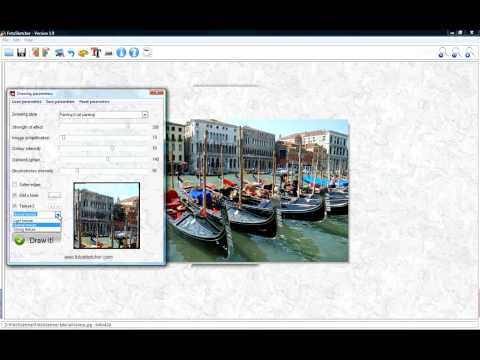
FotoSketcher is a 100% free program for Windows (there is also an experimental version for MacOS) which converts your digital photos into beautiful paintings, sketches or drawings automatically and in just a few mouse clicks.
Over 20 different styles are available from pencil sketches to watercolor or oil paintings, pen & ink drawings, abstract art and cartoons. From photo to painting (landscapes, architecture, portraits, etc.) in seconds!
You can also improve your original photos with simple tools (enhance contrast, sharpen, simplify image, increase luminosity, color saturation etc…) and add simple or realistic frames and text.
For advanced users, some more powerful tools allow you to batch process several images, manually retouch some areas of your pictures, combine multiple filters and even create your own effects by using the script function.
If you want to turn a portrait, the photograph of your house or a beautiful landscape into a painting, a sketch or a drawing then look no further, FotoSketcher will do the job in just a few seconds.
Thanks to FotoSketcher you can create stunning images to make original gifts for your friends or relatives. Create birthday cards, season’s greetings stationery or simply print your work of art and hang it on the wall.
Different styles are available: pencil sketch, pen and ink drawing, various painting renderings. You can also improve your original photo with simple tools (enhance contrast, sharpen, simplify image, increase luminosity, color saturation etc…).
FotoSketcher is completely free, even for commercial use and does not contain any adware, spyware or virus.
Changes in FotoSketcher 4.60:
Changes in FotoSketcher 4.50:
- New Crosshatch effect (Pencil Sketch category)
- New Light mode, switchable at any time
- New frame added
- Settings remembered between sessions (language and theme)
- Embedded example scripts included directly in the application to try, learn from, and adapt
- Script Editor now minimizes while a script runs, so you can watch the result build on the main image
- Keyboard navigation in the menu (F10)
- Save and overwrite safeguards: a prompt before exiting with unsaved changes, and a warning before overwriting an existing file
- On Windows: adjustable application zoom level for the interface (from 50% to 150%)
- Drastically reduced executable size on both Windows and macOS
- Improved script performance on both Windows and macOS
- Many macOS corrections to bring the Mac build in line with the Windows version
- A wide range of UI improvements on both platforms
- Bug fixes: fixed the Windows taskbar sometimes not appearing, fixed the macOS light style not applying correctly, plus other corrections and stability improvements
Changes in FotoSketcher 4.30:
- New LUTs effect. In the Photo Lab category you will find a new LUTs (Lookup Tables) effect for custom colour grading. It comes with 18 presets built right into the application (Cinematic, Kodachrome, Golden hour, Portrait and more), each with a live preview so you can see the look before applying it. Right-click the preview to compare with your original image. And if you have your own .cube files, you can load those from disk too.
- New “Stylize” category. I have added a brand-new Stylize category with four new effects. Three of them (Mosaic, Circles and Triangles) are built on the same space-filling idea, turning your photo into tiled mosaics, clusters of circles, or a low-poly triangle look. The fourth, Cartoon, is a bit different: it gives a clean graphic style with defined lines and solid colours. A little tip – set the colour intensity to 0 and Cartoon draws a pure outline drawing with no fill. Combined with the “Do not erase background” option, you can run it on top of any other effect to add crisp contours in two quick steps.
- Auto-Enhance and Full Reset. Two small but handy additions. Auto-Enhance (just press E) tries to optimise your source photo – exposure, white balance, local contrast – for a ‘dehazed’, natural-looking starting point. And Full Reset clears everything back to a clean slate in one step (working image, history, LUT, script, brushes and sliders) without having to close and reopen the program. Press Ctrl+Shift+N, or right-click the exit button.
- Scripts. The script engine has been updated to support all the new effects, with a few new commands and improved help. If you would like some inspiration, the recent scripting tutorial on this blog walks through several ready-made example scripts.
- The usual improvements. The interface now uses new colour accents for better readability, the history gallery has had a few tweaks, and you can now open .webp images directly. On top of that, this release includes some performance improvements and a good number of bug fixes.
Homepage – https://fotosketcher.com/
Supported Operating Systems: Windows 7, 8, 8.1, 10, 11 (32-bit, 64-bit).
Size: 35.2 MB
DOWNLOAD Installer for Windows 64-bit
DOWNLOAD Portable for Windows 64-bit
DOWNLOAD Installer for macOS
TOP ALTERNATIVES
-
 Corel PaintShop Pro X6 has everything you need to create stunning phot...
 -
 Leawo PhotoIns is the AI Photo Editor. It lets you automatically Enhan...
 -
Corel PaintShop Pro, a part of the PaintShop family of digital imaging...
-
 Batch Watermark Creator is a special program what batch adds text or i...
 -
 HitPaw FotorPea is the best AI tool for images, featured with advanced...
 -
 PortraitPro (formerly Portrait Professional) is new portrait airbrushi...
 -
 PanoramaStudio creates seamless 360 degree and wide angle panoramic im...
 -
 PhotoFiltre Studio is a complete image retouching program. It allows y...
 -
 Movavi Photo Editor is an AI-powered photo editing software for flawle...
Leave a Reply
0 Comments on FotoSketcher 4.60 – FREE photo editor