

UltraEdit 33.0.0.23 by IDM

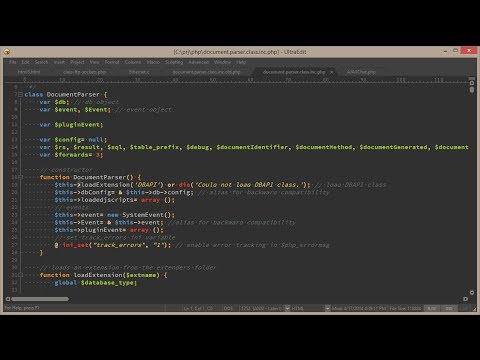
UltraEdit is the ideal text, HEX, HTML, PHP, Java, javascript, Perl, and Programmer’s editor. It’s versatile and easy to use, specially designed for inputting and editing text and code. Supports configurable syntax highlighting and code structuring for most any programming languages.
With its clear layout and powerful project and workspace features, it can handle complex and sophisticated software development projects.
This IDM product is flexible and easy to customize, handles files in excess of 4GB. And the polished user interface provides easy access to the most important options.
UltraEdit is used across a diverse range of industries. From professional writers, researchers and journalists to advanced programmers, database managers and web developers.
Scores of individuals use UltraEdit as a powerful replacement for windows notepad and even more use it as a text editor. Because of its ability to handle multiple documents at once, large file handling, powerful search/find/replace functionality, spell checking versatility and much more.
UltraEdit Key Features:
- Easily open and edit large files – 4 GB and beyond!
- Multi-caret editing and multi-select
- Column (block) mode editing
- Powerful search. Find and replace in files, regular expressions, inverse search, etc.
- File compare
- Code syntax highlighting for nearly any programming language
- Code folding and hierarchical function listing
- Beautify and reformat source code
- Powerful XML handling. XML tree view, reformatting, validation, etc.
- Auto-closing XML/HTML tags
- Smart templates – automatic intelligent code completion
- Editor themes – skin the entire app
- Powerful and configurable tools
- File and data sorting
- Integrated FTP client (supports FTP, SFTP, and FTPS)
- Integrated SSH/telnet client
- Filtered spell checker
- Unicode/ UTF-8 support
- Split/duplicate window editing
- Hex editing
- Macros and scripts for automated editing
- CSV data reformatting
- Log file polling
- File encryption and decryption
- Integrated Ctags (symbols listing)
- Base64 encode/decode
- Project support
- Robust bookmarking
Changes in UltraEdit 2026.0 Update 1 (2026-07-09):
- Fixed: Non-reproducible crash in UE while editing
- Fixed: Command palette navigation is incorrect
- Fixed: Quick Find for “**” fails
- Fixed: Toolbar corrupted after upgrading
- Fixed: “Select all” only selects a subset of visible lines
Changes in UltraEdit 2026.0 (2026-06-09):
- Features and enhancements
- Integrated Ask UltraEdit AI chat window
- Natural language access to full Help documentation
- Get feature use case recommendations from the full Power Tip library
- FTP enhanced server compatibility update
- Added Key Exchange Algorithm –
diffie-hellman-group18-sha512support - Added Key Exchange Algorithm –
diffie-hellman-group16-sha512support - Added Key Exchange Algorithm –
curve25519-sha256@libssh.orgsupport - Added Cipher Algorithm –
3des-cbcsupport - Added MAC Algorithm –
hmac-sha2-256-etm@openssh.comsupport - Added Cipher Algorithm –
rijndael256-cbcsupport - Added Cipher Algorithm –
rijndael-cbc@lysator.liu.sesupport
- Added Key Exchange Algorithm –
- Integrated Ask UltraEdit AI chat window
- Other notable quality improvements
- Fixed: Crypto algorithm could not be negotiated error returned when connecting to server
- Fixed: List lines containing find string omits some valid matches
- Fixed: Indent of multiple selections doesn’t work
- Fixed: Paste column doesn’t preserve pad spaces
- Fixed: Content in upper pane scrolls when typing in column mode in lower pane during split window editing
- Fixed: File in use error message on closing Account Manager dialog window
- Fixed: FTP transfer completes successfully but FTP open dialog remains locked for up to 25 seconds after transfer is complete
- Fixed: Saving via FTPS to Windows Server 2022 takes a very long time
- Fixed: “Error in certificate” dialog is shown every time connection is made
- Fixed: Content is pasted in wrong location when pasting in column mode on line with TABS
- Fixed: Search in “All open files” doesn’t work as expected if “Filter” option has previously been selected
- Fixed: Column mode delete key behavior changed
- Fixed: Multiple FTPS stability issues
- Fixed: Windows clipboard is not updated for secondary application when copying in Column mode
- Fixed: Crash while editing wordfile with specific settings
- Fixed: Batch file run from User tool cannot delete a file that’s already open
- Fixed: Files opened via command palette are not automatically added to Recently opened files list in File lists view
- Fixed: UltraEdit inserts TABS on empty lines
- Fixed: Perl option for regular expressions is lost on application restart
- Fixed: Crash with syntax highlighted file and switching to Contemporary menus
- Fixed: Focus unexpectedly jumps to previously matched string when pressing
CTRL+F - Fixed: Unexpected selection after using “Insert number”
- Fixed: JSCompressDocument and JSFormatDocument have no effect in macro
- Fixed: Multiple issues with modifying key mappings
- Fixed: HEX mode selection issues
- Fixed: Column reference in status bar not as expected with multi-byte characters
- Fixed: Focus in file shifts erratically when crossing lines with no text while creating column mode selection
- Fixed: Crash while navigating in specific document with specific settings
- Fixed: Alt+H in German ‘Ersetzen in Dateien’ window activates the wrong edit field
- Fixed: Syntax highlighting of dates (substrings starting with a digit) not working anymore
- Fixed: Selection is cleared when “search string not found” dialog is shown
- Fixed: Top pane scrolls unexpectedly with Column mode editing in split pane view
- Fixed: Crash after changing regex type in Find dialog with specific settings
- Fixed: Crash while attempting find with specific settings
- Updated: Change “Find” button to “Cancel” in Find in Files dialog during search
Homepage – https://www.ultraedit.com
System Requirements:
- Windows 10, 11
- macOS 11.5 and later, with support for Intel-based processors only.
- Ubuntu 18.04 +, RedHat/CentOS, Fedora, SUSE
TOP ALTERNATIVES
-
 EmEditor is a fast, lightweight, yet extensible, easy-to-use text edit...
 -
 Microsoft Visual C++ 2010 provides a powerful and flexible development...
 -
 Microsoft Visual C++ Redistributable provides a powerful and flexible ...
 -
 Microsoft Visual Studio 2015 with MSDN provides the comprehensive solu...
 -
 Notepad2 is a small, light-weight, fast, free and open source Notepad-...
 -
 Maxima is a FREE computer algebra system comparable to commercial syst...
 -
 WinHex is a universal hexadecimal editor, particularly helpful in the ...
 -
 Visual Studio 2026 is a Microsoft’s integrated development envir...
 -
 Microsoft .NET 10.0 is a free, cross-platform, open-source developer p...
Leave a Reply
0 Comments on UltraEdit 33.0.0.23 by IDM