

Stardock Start11 2.8.1.0


 (63 votes, 3.56)
 Loading...
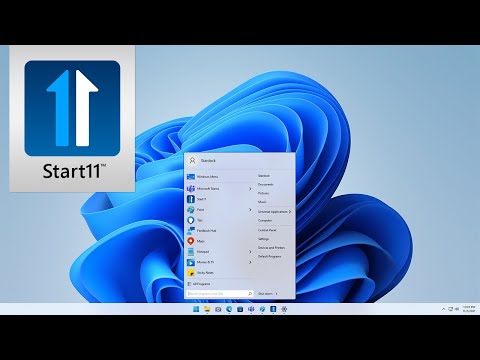
Stardock Start11 application allows you to restore the Classic Start Menu in Windows 10/11. Replace the Start menu with a classic version. This Windows 7-style look is a comfortable return to the form and function you expect.
You can also customize the layout of the Start menu, adjust its size and location, tweak icons and more. Choose your favorite color for the Start menu and enjoy custom textures for your taskbar. An array of bundled images and textures let you personalize your PC.
In addition to the Start menu, using Stardock Start11 you can customize the Taskbar, including adjusting transparency, adding textures and more. Other options include tweaking Search, integration with other product from Stardock – such as Fences – and tweaking the mouse button and keyboard shortcuts.
Quick and convenient access to search means your desktop applications and new Universal applications are always accessible. If you are running with multiple monitors, you can add a Start menu to the secondary taskbar for always at hand access.
Top Current Features:
- Choose from several Start menu layouts
- Works on Windows 10/11
- Integrate Stardock’s “Fences” into the Start Menu
- Quickly access search on your desktop
- Add color / texture to the Start menu and taskbar
What’s coming to Stardock Start11:
- Significantly faster search / detailed search results
- Improved search results with new search engine
- Perform simple math problems in the search box
- Additional style options
- Enhanced productivity features
- Improved configurability of Windows 7 / Modern modes
Changes in Stardock Start11 2.8.1.0:
- Fixes taskbar alignment problem with centered taskbar icons on secondary displays when the taskbar is at the bottom.
Changes in Stardock Start11 2.8.0.0:
- Adds in support for the new Win11 26H2 taskbar updates to respect Windows settings.
- Positions are respected only when set to “Allow Windows to control taskbar position”, which is the default on a clean install.
- The OS only allows all monitors to use the same setting, but you can resize the bars when using Enhanced Taskbar mode. If you want different positions, then use the Start11 options.
- Fixes an issue with vertical taskbars on secondary displays.
- Fix for some vertical taskbar issues, including blank icons for Microsoft Edge when in Uncombined mode.
- Fix for Start button when Enhanced Taskbar is not enabled.
- Addresses an issue with icons being wrong for a couple of apps on Enhanced Taskbar.
- Disabled custom right click taskbar menu when disabling all Start11 taskbar features.
- Performance improvements for all machines but especially ARM CPUs.
Changes in Stardock Start11 2.7.3.0:
- Addresses unresponsive taskbar issues
- Fix for search not finding all settings on some machines
- Addresses an issue from previous build introduced with DisplayFusion
- Includes support for a new registry key S11_UseWin11RightClickOnGroups
Changes in Stardock Start11 2.7.1.0:
- This fixes the issue with the network icon being the wrong way up on some machines when the taskbar is at the top
- Fixes some of the latest Canary builds of Windows 11 issues, such as wrong thumbnails and a problem resizing some vertical taskbars.
- This works around an issue with larger desktop icons on mixed dpi setups when the taskbar is at the top of the screen
- Fix for clicking on secondary taskbars on a monitor to the left of the primary when in combine mode not popping up the task switcher window when > 1 window for that process is running.
- Resolves an issue with disabling S11 taskbar features entirely, where if you had the taskbar set to on top, then it would hang with this set
- Added option to control win7 menu showing in dark mode or not. This is on the same dialog as picking a custom color
- Further tweak for taskbar in latest Canary build
- Ensured dark mode auto detect mode for start menu colours is Win7/modern theme only.
Homepage – https://www.stardock.com/products/start11/
System Requirements: Windows 10, 11.
Languages included: English, Arabic, Czech, Dutch, Finnish, French, German, Hungarian, Italian, Japanese, Korean, Polish, Portuguese, Russian, Simplified Chinese, Spanish, Swedish, Traditional Chinese, and Turkish
Size: 54.9 MB
DOWNLOAD Stardock Start11 Trial
TOP ALTERNATIVES
-
 Stardock DesktopX is a desktop utility designed to enable users to bui...
 -
 StartAllBack fixes all Microsoft Windows 11 deal-breaking UI issues. T...
 -
 Stardock ModernMix is a revolutionary new application that enables you...
 -
 Stardock IconPackager is the most popular program to change all the ic...
 -
 Desktop iCalendar is a customizable calendar program that gets calenda...
 -
 GadgetPack (formerly 8GadgetPack) is a utility that installs the origi...
 -
 Pokki is a free software that lets you to make Windows 8 better and br...
 -
 Stardock DeskScapes gives you the capability to animate and customize ...
 -
 Dexpot is a utility for virtual desktops. It lets you have separate vi...
Leave a Reply
0 Comments on Stardock Start11 2.8.1.0