

Light Image Resizer 7.5.0.142 by Obvious Idea



 (32 votes, 3.63 out of 5)
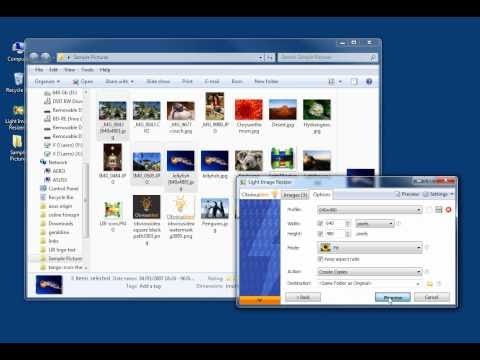
Light Image Resizer from Obvious Idea (previously known as VSO Image Resizer) is a free tool that organizes your photos by shrinking their resolution or moving them within your hard drive.
It is the perfect tool for those who store their digital pictures and images on their PC and who want to resize, compress, convert, create copies, import or organize photos.
Using this free resize image software, you can create e-mail friendly versions of your images, load them faster, move them easily from folder to folder, change their format, edit large numbers of image files/batch image resize and thus save space on your hard drive.
Add your own watermark to protect your work or add a copyright to photos with html-like text formatting and transparency support. Customize pictures by converting them to sepia or add a border. Use the live preview to see what the final result will look like before actually processing the image.
The ObviousIdea Photo Resizer/Picture Resizer works on files, subfolders and folders, and supports RAW formats. With multi-core support integrated, you can convert images even faster. Launch the application easily from Windows shell explorer with a right click on the image or folder.
Light Image Resizer Key Features:
- Resize pictures, resize photos and resize images – compress, convert, and easily create copies of your pictures
- A fast batch photo resizer
- High quality results using ultra fast multi-core, photo resize technology
- High quality image resizing filters – Lanczos and Bicubic for best compression quality, and Linear for speed
- Create e-mail friendly images or use them for internet publishing
- Sort, rename or add a watermark to protect your pictures from being stolen
- Use the profiles library – iPhone, iPad mini, forum, HQ
- New – create custom PDF pages !
- Easy to convert JPEG to PDF
You can add photos directly as attachments, individually or in a ZIP file, to email by using the publish function, without exceeding the maximum size permitted by email servers. Create PDF files from your images, like jpg to PDF. Do this for individual or multiple images. Edit, create, export, backup new profiles with your favorite settings.
The most popular profiles are already pre-defined, such as FULL HD resolution wallpaper images, iPod, NTSC, 640 x 480. Access to profiles in 1 click with the shell integration.
Transfer photos and optimize space on digital frames with the Digital Picture Frame Wizard. You can use the resize picture options to resize to the frame’s supported resolution, and add even more photos for viewing !
The program is available as a windows shell extension. Just right click to easily resize pictures as copies or continue to work on the original HQ photos. Then share your resized photos online with friends. It’s freeware software if you use it for personal use.
Changes in version 7.5.0.142 (2025-12-22):
NEW:
- added OpenAI GPT-5.1, GPT-5.2 models
- added Gemini 2.5 Pro, Gemini 3 Pro Preview, Gemini 3 Flash Preview models
FIXED:
- DPI value was not set correctly when saving screenshot as JPEG (Light Image Editor)
- small offset when taking screenshot of a window (Light Image Editor)
- settings may not have been synchronized correctly in some cases (Light Image Editor)
- layers were not merged when submitting to Vision AI (Light Image Editor)
- access violation when using right-click menu to copy an AI input image to the clipboard (Light Image Editor)
- output image may have been sheared when format was set to JPEG XL
- message “Error fetching Ollama models” could appear on startup (Light Image Editor)
IMPROVED:
- resampling quality has been improved for certain cases when downsizing very large images
- add light tray icon for dark system theme (Light Image Editor)
Changes in version 7.4.0.129 (2025-11-17):
- NEW: AI Image Generation/Editing tool (Beta) (Light Image Editor)
- FIXED: line breaks in AI prompt were not correctly saved in profiles
- FIXED: CMYK color profile may have been copied despite the respective ICC option was disabled
- IMPROVED: copy EXIF, ICC from HEIC when converting to JPEG
Homepage – https://www.obviousidea.com
Supported Operating Systems: Windows 7, 8, 8.1, 10, 11.
There is no version available for Mac.
TOP ALTERNATIVES
-
 Ashampoo Cinemagraph is the software to create animated photographs wi...
 -
 MediaChance Dynamic PHOTO-HDR is a new generation of High Dynamic Rang...
 -
 Luminar AI is the first image editor fully powered by artificial intel...
 -
 Ashampoo Photo Commander 15 is the comprehensive solution to view, edi...
 -
 HitPaw FotorPea is the best AI tool for images, featured with advanced...
 -
 RIOT (Radical Image Optimization Tool) is a free image optimizer that ...
 -
 Movavi Photo Editor is an AI-powered photo editing software for flawle...
 -
 Ashampoo Photo Optimizer 2025 is the simplest and fastest way for opti...
 -
 FotoSketcher is a 100% free program for Windows (there is also an expe...
Leave a Reply
0 Comments on Light Image Resizer 7.5.0.142 by Obvious Idea