

KeePass 2.61.1 / KeePass 1.43 Classic



 (23 votes, 3.39 out of 5)
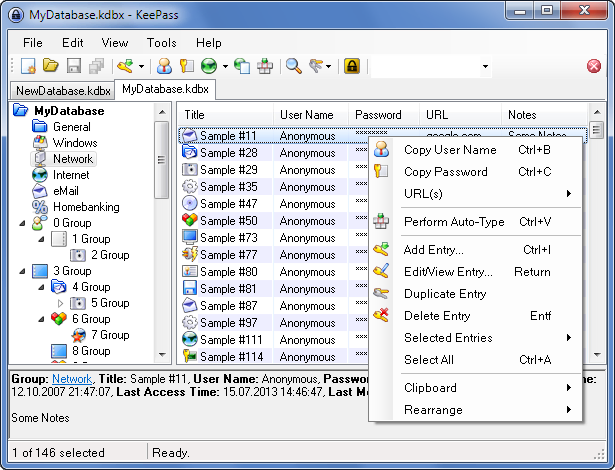
KeePass is a free open source password manager, which helps you to manage your passwords in a secure way. You can put all your passwords in one database, which is locked with one master key or a key file. So you only have to remember one single master password or select the key file to unlock the whole database.
The databases are encrypted using the best and most secure encryption algorithms. A password database consists of only one file that can be transferred from one computer to another easily.
KeePass supports the Advanced Encryption Standard (AES, Rijndael) and the Twofish algorithm to encrypt its password databases.
Both of these ciphers are regarded as being very secure. AES e.g. became effective as a U.S. Federal government standard and is approved by the National Security Agency (NSA) for top secret information.
KeePass All Features:
KeePass uses the common CSV export format of various passwords safes like Password Keeper and Password Agent. Exports from these programs you can be easily import to your KeePass databases. The password list you can be export to various formats like TXT, HTML, XML and CSV.
The application has portable edition: you can carry it on an USB stick and runs on Windows systems without installation.
Strong Security
- The app supports the Advanced Encryption Standard (AES, Rijndael) and the Twofish algorithm to encrypt its password databases. Both of these ciphers are regarded as being very secure. AES e.g. became effective as a U.S. Federal government standard and is approved by the National Security Agency (NSA) for top secret information.
- The complete database is encrypted, not only the password fields. So, your user names, notes, etc. are encrypted, too.
- SHA-256 is used to hash the master key components. SHA-256 is a 256-bit cryptographically secure one-way hash function. No attacks are known yet against SHA-256. The output is transformed using a key derivation function.
- Protection against dictionary and guessing attacks: by transforming the master key component hash using a key derivation function (AES-KDF, Argon2, …), dictionary and guessing attacks can be made harder.
- Process memory protection: your passwords are encrypted while KeePass is running, so even when the operating system dumps the KeePass process to disk, your passwords aren’t revealed.
- [2.x] Protected in-memory streams: when loading the inner XML format, passwords are encrypted using a session key.
- Security-enhanced password edit controls: KeePass is the first password manager that features security-enhanced password edit controls. None of the available password edit control spies work against these controls. The passwords entered in those controls aren’t even visible in the process memory of KeePass.
- The master key dialog can be shown on a secure desktop, on which almost no keylogger works. Auto-Type can be protected against keyloggers, too.
Changes in KeePass 2.61.1 Professional:
- Improved workaround for focus bug after returning from a secure desktop.
- Improved initial application of the ‘Always on Top’ option.
- Improved dialog management.
- Improved HTML viewer initialization.
- Reduced flickering in the ‘Print’ dialog.
- The option ‘Unhide empty data’ (in ‘Tools’ → ‘Options’ → tab ‘Advanced’) is now turned on by default.
- Improved filtering in the field reference creation dialog.
- Improved disposal of process objects.
- Improved performance of the initial key modifier release when performing auto-type on Unix-like systems with XDoTool.
- File transactions where the base file does not exist yet and is accessed via a URL do not fail anymore.
- Various code optimizations.
- Minor other improvements.
Changes in KeePass 2.61 Professional:
New features:
- Added option ‘Match diacritics’ in the ‘Find’ dialog (turned off by default, i.e. the search is diacritic-insensitive).
- If the option ‘Check for update at KeePass startup’ is activated, KeePass now initiates the check before trying to open a database (asynchronously); if an update is found while a master key prompt dialog is displayed, the availability of the update is indicated by a banner in the dialog.
- When pasting a shared secret in the one-time password generator settings dialog, white-space characters are now removed automatically if the selected encoding is Base16/Hex, Base32 or Base64.
- Added buttons in the one-time password generator settings dialog for copying the current one-time password to the clipboard.
- The one-time password generator settings dialog now supports displaying settings of history entries.
- If the active database is saved to a local file during the last phase of a synchronization, the saved data is now copied to the other involved files (including URLs; this is usually faster than building and saving new files).
- The ‘Synchronize active database with a file/URL’ trigger action now supports synchronizing with multiple files/URLs at once (specify them in the ‘File/URL’ field, each one enclosed in double quotation marks; if different I/O connection credentials are required, use multiple actions instead).
- The ‘Synchronize active database with a file/URL’ trigger action now supports two new options: ‘On error – Silent’ and ‘On error – Continue’ (both turned off by default).
- When entering an incorrect master key for confirming an export, KeePass now asks for it again, just as often as when opening a database (customizable using the ‘
MasterKeyTries‘ configuration option). - MSI setup: added ‘
KPS_OPTIONS‘ property, which allows to customize a (silent) installation (whether to create shortcuts, etc.).
Improvements:
- Quick searches, searches in the icon picker dialog, field reference searches, filters in report dialogs and searches in the options dialog are now more tolerant (case- and diacritic-insensitive, current culture rules).
- Entry searches now use the rules of the current culture.
- Improved activation of an already running KeePass instance.
- When switching to a secure desktop, the UAC sound is now played (if the option ‘Play UAC sound when switching to secure desktop’ is activated) at the system sound volume (instead of the application-specific volume).
- Improved database tab tooltip (reduced flickering, etc.).
- When closing a database, the view of the next database is now restored.
- The
{TIMEOTP}placeholder is now classified as non-active (which causes it to be replaced in more situations). - Improved time stability of placeholders during searches for duplicate/similar passwords and password quality reviews.
- Improved import/synchronization of multiple files at once.
- Improved synchronization error messages.
- Improved file transaction error messages.
- Improved FTP connection error messages.
- Improved parsing of the value of a ‘File/URL’ or ‘Key file’ field of a trigger event/condition/action.
- Improved workaround for .NET/Windows
TopMost/WS_EX_TOPMOSTdesynchronization bug. - Improved workaround for Mono window minimization bug.
- Upgraded installer.
- MSI setup: improved shortcut creation/deletion.
- Various UI text improvements.
- Various code optimizations.
- Minor other improvements.
Bugfixes:
- In the entry dialog, editing one-time password generator settings does not cause the repeated password to be set to the password anymore.
- When synchronizing the active database with a manually selected file/URL, the trigger events ‘Synchronizing database file’ and ‘Synchronized database file’ are now raised as expected.
Changes in KeePass 1.43 Classic:
New Features:
- Added option ‘Prevent certain screen captures’ (in ‘Tools’ → ‘Options’ → tab ‘Advanced’, turned off by default); note that this may also prevent legitimate other software (remote desktop solutions, accessibility tools such as screen magnifiers, etc.) from seeing KeePass windows.
- Added
{PASSWORD_ENC}placeholder, which is replaced by the password of the current entry in encrypted form (DPAPI/CryptProtectData). - Added ‘
-pw-enc:‘ command line parameter.
Improvements:
- Improved database save confirmation dialog text.
- Improved behavior of the translation system for untranslatable strings.
- Improved project cleanup script.
- Upgraded installer.
- Various UI text improvements.
- Various code optimizations.
- Minor other improvements.
Bugfixes:
- Fixed a Windows version detection bug.
Homepage – https://keepass.info
Supported Operating Systems: Windows 7, 8, 8.1, 10, 11 (32-bit, 64-bit).
Size: 4.23 MB
DOWNLOAD KeePass 2.61.1 (Installer EXE for Windows)
DOWNLOAD KeePass 2.61.1 Portable (ZIP Package)
DOWNLOAD KeePass 1.43 Classic Edition (Installer EXE)
DOWNLOAD KeePass 1.43 Classic Portable (ZIP Package)
TOP ALTERNATIVES
-
 Ashampoo WebCam Guard provides secure access to your webcam and microp...
 -
 O&O BrowserPrivacy is a small application that protects your priva...
 -
 Steganos Privacy Suite is the all-in-one carefree data protection pack...
 -
 Windows Firewall Control is a nifty little application which extends t...
 -
 TinyWall is a free software to harden and control the advanced firewal...
 -
 Perfect Keylogger is a new generation keylogger which is absolutely un...
 -
 Hide Folders is an innovative software application which enables you t...
 -
 ZoneAlarm provides industry leading computer and Internet security sof...
 -
 Kamo by CCleaner masks users’ digital fingerprints with Private Conn...
Leave a Reply
0 Comments on KeePass 2.61.1 / KeePass 1.43 Classic