

WinContig 5.0.3.4 – Freeware Defragmenter


 (19 votes, 3.26)
 Loading...
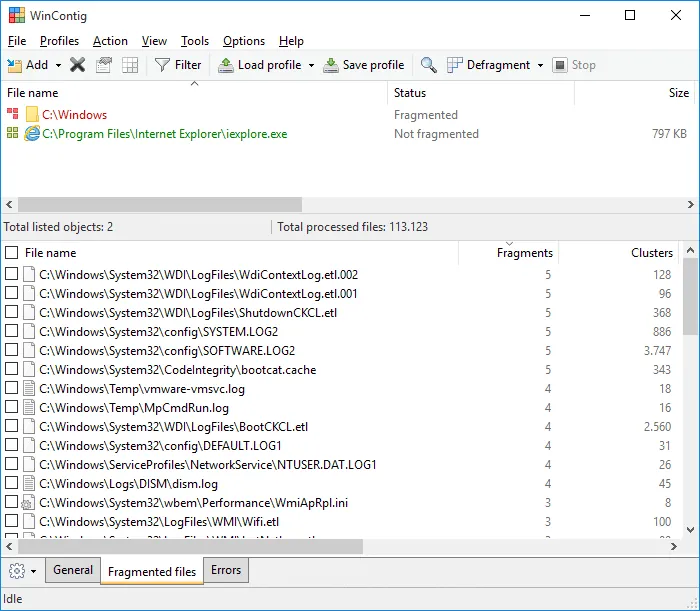
WinContig is an easy-to-use standalone executable defragmenter. It doesn’t create any installation directories or Registry entries on your computer.
Its purpose is to quick defragment files without the need to defragment the whole disk. In addition, WinContig allows you to group files and folders into profiles for processing them later.
WinContig supports FAT32 and NTFS file systems and it works with Hard Disks and SSDs.
Most defragmentation tools perform a general defragmentation of an entire partition. In a real life scenario, you often want to defragment a single file or a directory, for example to improve the loading speed of a program file, or to reduce the loading time of a certain disk intensive application like a game.
WinContig has been designed specifically to meet the needs of users who focus mainly on files and folders rather than an entire disk.
Its ability to filter files by several criteria combined with its ability to be controlled via command-line switches, make WinContig the perfect tool to defragment particular files that are frequently used and continuously becoming fragmented.
In order to start using it, just extract the contents of the ZIP archive to any folder you like, and run it. Its defragmentation and analysis engine is based on the standard Microsoft defragmentation API.
Two different defragmentation methods:
If you choose the Quick method, WinContig does look for the first amount of free space large enough to defragment a file into and uses it. Use this defragmentation method if you use tools like Windows Defrag to defragment your hard disk on a regular basis.
If you choose the Smart method, program does look for the amount of free space that best fits a file into ad uses it. Also, if there is no free space large enough to fully defragment a file into, WinContig does try to reduce the number of fragments of that file.
This application is freeware for personal and commercial use.
What’s new in version 5.0.3.4:
- The WinContig shell extension did not work properly when used with Windows Jump Lists on certain systems. Fixed.
- The execution time of several operations has been improved.
- On certain systems, scanning a volume for file system errors might lead to the process getting stuck in an infinite loop. Fixed.
- Some minor graphic improvements.
What’s new in version 5.0.3.3:
- If one or more filter criteria are set, the filter icon may fail to display the expected small green notification dot on the toolbar. Fixed.
- If WinContig is run from the command-line with the ‘/close’, ‘/closeifok’ or ‘/nogui’ parameters specified, the ‘Critical Stop’ sound notification is played upon exit. Fixed. Thanks to MacMacMac for reporting this.
- Even when the settings have been configured to take no action when a computer is running on battery power, WinContig stops processing files when a computer is running on battery power. Fixed.
- The execution speed of some operations has been improved.
What’s new in version 5.0.3.2:
- Fixed a bug that could cause items in the exclusion list to be saved or loaded incorrectly.
- The execution speed of some operations has been improved.
What’s new in version 5.0.3.1:
- WinContig may fail to access some files on a combination of Windows version and installed updates. A workaround has been introduced to address this issue. Thanks to Allan Higdon for reporting this.
Homepage – https://www.mdtzone.it/
Supported Operating Systems: Windows 7, 8, 8.1, 10, 11 (32-bit, 64-bit).
Size: 1.40 MB
DOWNLOAD WinContig Freeware
TOP ALTERNATIVES
-
 Puran Defrag is a very simple disk defragmenter which defrag the files...
 -
 Auslogics Disk Defrag 11 is a vital maintenance tool that will improve...
 -
 Defraggler is a free file defragmentation tool. It speeds up your PC b...
 -
 Paragon Total Defrag is a new comprehensive product for total file sys...
 -
 Glarysoft Disk SpeedUp is a totally free and extremely fast defragment...
 -
 Condusiv’s Diskeeper is disk defragmenter that prevents degradation ...
 -
 DiskMagik – Powerful and Easy-to-use Disk Defrag Software. It is...
 -
 IObit Smart Defrag 12 is a Free Disk Defragmenter, that accelerates th...
 -
 UltimateDefrag is the powerful Defragger And File Placement Optimizer ...
Leave a Reply
0 Comments on WinContig 5.0.3.4 – Freeware Defragmenter